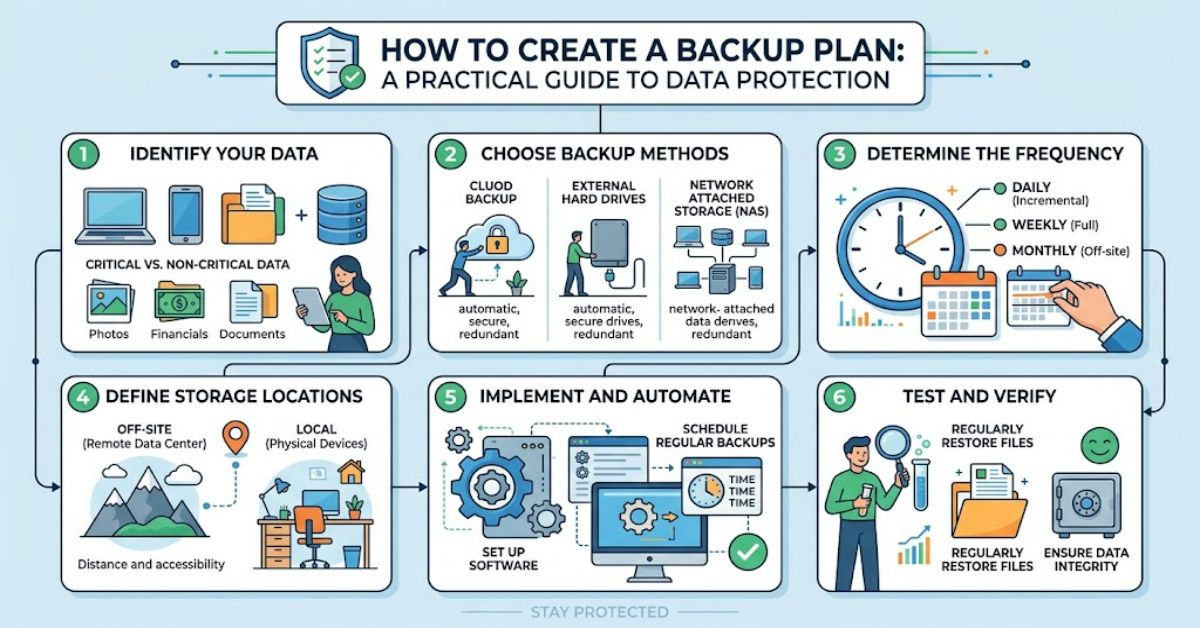
Knowing how to create a backup plan is essential for anyone who relies on digital files, computers or online services. A dependable plan helps recover important information after accidental deletion, hardware failure, cyberattacks, theft or unexpected disruption. The strongest approach combines the established 3-2-1 backup strategy with clear recovery targets, secure storage and regular restoration tests.
A backup is a separate copy of information that can be restored if the original becomes unavailable or damaged. However, simply copying files to an external drive is not enough. That drive could fail, become infected by ransomware or be lost alongside the computer it was meant to protect. Cloud storage can also create a false sense of security if synchronisation copies deletions or corrupted files across devices.
An effective plan therefore considers what must be protected, how often it changes, where copies are stored and how quickly recovery is required. Personal users may need to preserve family photographs, financial documents and work files. Businesses may also need to recover customer records, databases, applications and essential operational systems.
The objective is not to eliminate every possible risk. It is to reduce the likelihood of permanent data loss and make recovery manageable when something goes wrong. This guide explains how to build a practical backup system, choose suitable storage, set realistic recovery targets and verify that saved information can actually be restored.
1. Identify What Needs to Be Backed Up
Start by listing the files and systems that would cause the greatest problems if they disappeared. Include documents, photographs, emails, financial records, customer databases, website files, software configurations and project folders.
Separate essential information from files that can easily be downloaded or recreated. This distinction helps control storage costs and reduces the time needed to restore important data.
For businesses, prioritise information according to its operational and legal importance. The Information Commissioner’s Office explains that organisations handling personal data must consider how to restore access following physical or technical incidents.
2. Follow the 3-2-1 Backup Strategy
The 3-2-1 strategy provides a practical foundation for protecting important information.
- Three copies: Keep the original data and two additional copies.
- Two storage types: Use different storage media or systems to reduce shared failure risks.
- One off-site copy: Maintain a copy in a separate physical location or appropriately isolated remote environment.
For example, a small business might keep working files on its main computer, a backup on an external drive and another encrypted copy in a remote backup service.
However, three copies do not automatically guarantee safety. If every copy is accessible through the same compromised administrator account, ransomware could potentially affect them all. The UK National Cyber Security Centre recommends designing backups to resist deletion, corruption and unauthorised access.
3. Set Recovery Targets
Two measurements help determine whether a backup plan meets real needs.
Recovery Point Objective (RPO) defines how much recent data loss is acceptable. An RPO of 24 hours means the organisation must be prepared for losing up to a day’s changes if the latest usable backup is 24 hours old.
Recovery Time Objective (RTO) defines the maximum acceptable period for restoring a system or service.
| Example system | Illustrative RPO | Illustrative RTO |
| Personal photographs | 24 hours | 48 hours |
| Business documents | 12 hours | 8 hours |
| Online shop database | 15 minutes | 2 hours |
| Historical archive | 7 days | 5 working days |
These are planning examples, not universal standards. Actual targets depend on business requirements, costs and technical capacity.
A useful insight is that backup frequency and restoration speed are separate problems. Saving information every 15 minutes will not help much if rebuilding the system takes three days. Both targets must be considered together.
4. Choose the Right Backup Method
Different storage methods offer different benefits.
| Method | Main benefit | Main limitation |
| External hard drive | Affordable and straightforward | Can be damaged, stolen or infected if permanently connected |
| Cloud backup | Remote storage and convenient access | Depends on provider security, connectivity and account access |
| Network-attached storage | Centralised storage for multiple devices | May remain vulnerable to attacks on the local network |
| Offline storage | Strong isolation from many online threats | Requires careful handling and manual procedures |
| Managed backup service | Automation and specialist support | Ongoing costs and reliance on provider arrangements |
A sensible plan often combines automated local backups with an independent off-site copy. Choose a method that matches the volume of data, available budget and recovery requirements.
5. Protect Backups Against Ransomware
Ransomware can encrypt original files and attempt to destroy connected backups. Protecting backup copies is therefore as important as creating them.
Use encryption for sensitive information, multi-factor authentication where available, separate administrator accounts and restricted permissions. Consider immutable storage, which prevents backup data from being altered or deleted during a defined retention period.
Keep at least one backup isolated from everyday systems. Protect encryption keys separately and document how authorised users can retrieve them during an emergency.
Another frequently overlooked risk is account lockout. A remote backup may still exist but become inaccessible if the organisation loses its identity system or administrator credentials. Maintain a secure recovery procedure that does not depend entirely on the systems being restored.
6. Schedule and Test Your Backups
Automate backups wherever practical. Daily backups may suit ordinary documents, while frequently updated business databases may require more frequent copies. Review the schedule whenever workloads or data volumes change.
Testing is essential. A successful backup notification confirms that a process ran, but it does not prove that every file is intact or that an entire service can be restored.
Test individual file recovery first, then perform broader restoration exercises. Record how long each test takes, check recovered data for completeness and correct any failures.
The National Cyber Security Centre’s ransomware guidance emphasises version history, protected backup data and regular restoration testing. These measures help prevent corrupted copies from becoming the only available recovery option.
The Future of Backup Planning in 2027
By 2027, backup planning is likely to place even greater emphasis on ransomware-resistant storage, automated monitoring and recovery exercises. These developments build on existing guidance rather than guaranteeing that newer technology will eliminate data loss.
Cloud services increasingly offer features such as version retention, deletion protection and immutable storage. Their effectiveness still depends on configuration, account security, retention settings and the ability to restore information independently.
Organisations handling personal information should also continue to assess their responsibilities under UK data protection law. The Information Commissioner’s Office states that organisations must be able to restore access to personal data within a timeframe appropriate to the circumstances.
The practical priority is clear: invest in reliable recovery processes, not simply additional storage capacity. Technology can automate routine tasks, but documented procedures, access controls and tested restoration remain necessary.
Key Takeaways
- Identify essential information before purchasing backup storage.
- Apply the 3-2-1 strategy while separating copies from shared security risks.
- Set realistic RPO and RTO targets based on operational needs.
- Encrypt sensitive backups and protect access credentials.
- Test restoration rather than relying on successful backup notifications.
- Review retention periods, storage costs and recovery procedures regularly.
Conclusion
A reliable backup plan is a practical safeguard against accidental deletion, hardware failure, cyberattacks and unexpected disruption. Its effectiveness depends on more than the number of copies stored. The location, security, age and recoverability of each copy all influence the final outcome.
The 3-2-1 strategy provides a useful starting point, while recovery point and recovery time objectives help translate general intentions into measurable requirements. Combining these principles with encryption, isolated storage, access controls and scheduled restoration tests creates a stronger foundation for data protection.
Individuals can begin with essential personal files, an external drive and a separate remote copy. Businesses should extend the process to critical applications, customer information, operational dependencies and documented recovery responsibilities.
No single arrangement suits every situation. The best plan balances risk, cost and recovery needs, then improves as those needs change. Most importantly, a backup should be treated as a system that requires ongoing maintenance and testing, rather than a task completed once and forgotten.
Frequently Asked Questions
1. How often should you back up your data?
Back up data according to how frequently it changes and how much loss is acceptable. Daily backups may suit personal documents, while critical business systems may need copies every few minutes or hours.
2. What is the best way to create a backup plan?
Identify important data, apply the 3-2-1 strategy, define recovery targets, select secure storage, automate backups and test restoration regularly.
3. Is cloud storage enough for backups?
Not always. Synchronisation can replicate accidental deletions or corrupted files. Maintain an independent backup with appropriate version history and protection against unauthorised deletion.
4. What is the 3-2-1 backup rule?
Keep three copies of your data, store them across two types of storage and maintain one copy off-site. For stronger protection, isolate or make at least one backup resistant to alteration.
5. How can you test whether a backup works?
Restore selected files to a separate location, check their integrity and confirm that they open correctly. Businesses should also practise recovering complete systems.
6. How much does a backup plan cost?
Costs depend on storage capacity, backup frequency, retention periods and support requirements. Personal users may need only an external drive and cloud storage, while businesses may require managed services and dedicated recovery infrastructure.
References
Cybersecurity and Infrastructure Security Agency. (2023). #StopRansomware guide.
Information Commissioner’s Office. (n.d.). A guide to data security.
National Cyber Security Centre. (2024). Back up your organisation’s critical data.
National Cyber Security Centre. (n.d.). Ransomware-resistant backups.
National Institute of Standards and Technology. (2010). Contingency planning guide for federal information systems (Special Publication 800-34, Revision 1).
Methodology
This article Backup Plan was prepared using published guidance from the UK National Cyber Security Centre, the Information Commissioner’s Office, the US Cybersecurity and Infrastructure Security Agency and the National Institute of Standards and Technology. These sources support the discussion of backup security, recovery objectives, restoration testing and data protection.
The recovery targets in the tables are illustrative examples, not independently measured performance results or universal recommendations. No hands-on product testing or practitioner interviews were conducted for this article. Storage requirements, recovery times and legal obligations vary by organisation and system. Readers should assess their own risks and verify applicable requirements before implementing a backup policy.
This article Backup Plan was drafted with AI assistance and requires human editorial review and verification before publication.