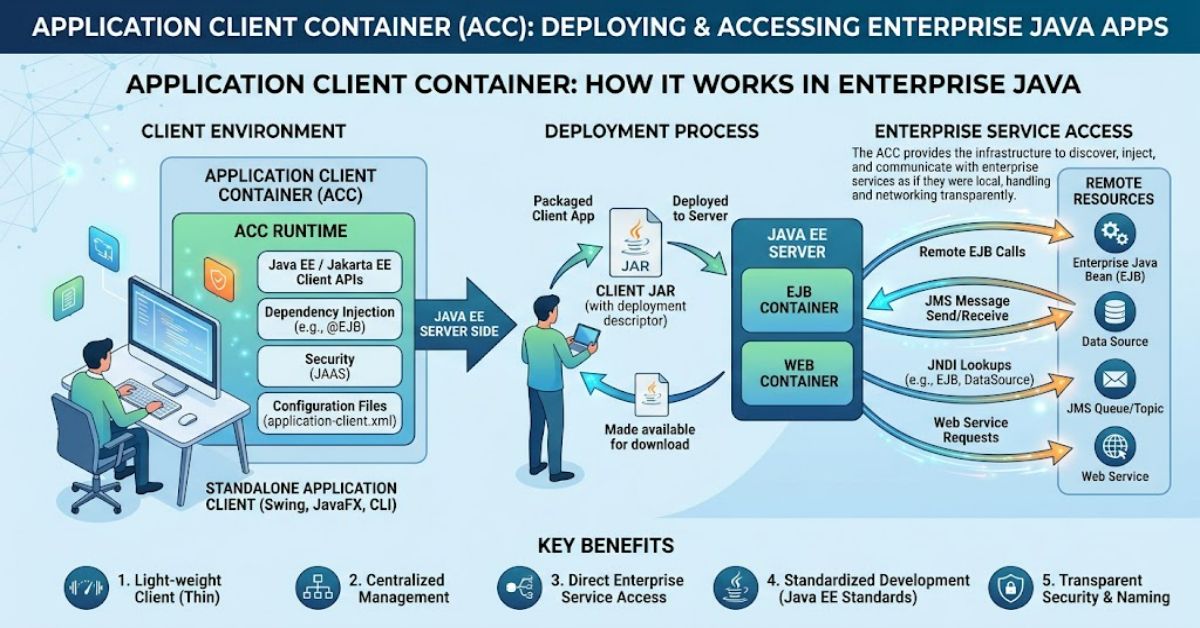
An Application Client Container is a lightweight runtime environment that runs on a client machine and manages the execution of Java enterprise client applications. Rather than requiring a full application server on every computer, it allows a standalone Java application to connect to enterprise services hosted remotely.
The container acts as a managed layer between the client application and the enterprise infrastructure. It provides access to supported Java EE, now Jakarta EE, services while handling configuration and runtime responsibilities that would otherwise need to be implemented separately.
For example, an organisation might use a desktop application to retrieve customer records, submit orders or generate reports. The business logic and data may remain on a central application server, while the client application provides the user interface. An ACC can support this arrangement by helping the client locate and communicate with the remote services it needs.
The important distinction is that an ACC is not the same as a web browser, a database driver or a complete application server. It is specifically designed to support Java enterprise client applications within a compatible runtime environment.
Although modern software increasingly uses web interfaces, REST APIs and cloud-based services, the ACC remains relevant when maintaining existing enterprise Java systems or working with application servers that support this model. Understanding its responsibilities, advantages and limitations helps developers choose an appropriate client architecture.
What Is an Application Client Container?
An Application Client Container is a runtime environment designed for standalone Java enterprise applications. It supplies the platform services required by a client application to interact with enterprise components hosted on a remote server.
In a traditional Java EE architecture, the application server hosts business components and manages resources such as transactions, security and persistence. The client runs separately, often on a desktop computer or workstation, and communicates with the server over a network.
The ACC manages the client application’s execution within the capabilities of the relevant Java enterprise platform. Depending on the implementation, it may support dependency injection, resource lookup, security configuration and access to remote enterprise components.
It is called a container because it provides an execution context with defined services and rules. It is not simply a folder containing application files, nor does it necessarily isolate applications in the same way as an operating-system container.
The ACC is also distinct from the web container, which manages components such as servlets and web application requests, and the Enterprise JavaBeans container, which manages enterprise business components on the server.
How an Application Client Container Works
The ACC enables a client application to use enterprise services without hosting the entire enterprise application locally. The exact process depends on the application server and the Java enterprise platform version.
A typical workflow includes the following stages.
1. Client application installation
The standalone Java client and its required configuration are installed on the client machine. The application must be compatible with the runtime and libraries it uses.
2. Container launch
The client is started through the supported application-client launcher or server-specific mechanism. The ACC establishes the execution environment and makes configured platform services available.
3. Resource and service lookup
The application locates the resources it needs, such as configured naming entries or remote business components. Resource names and connection details must match the deployment configuration.
4. Authentication and connection
Where security is configured, the client supplies or obtains suitable credentials. The application then establishes communication with the remote service using the supported protocol and security settings.
5. Remote operation
The client invokes available business operations. The server performs the relevant processing, applies its business rules and returns the result.
6. Result handling and shutdown
The client displays or processes the returned information. When the application closes, its runtime resources and connections should be released appropriately.
This division keeps core business processing on the server while allowing a separate client to interact with it.
Core Components and Responsibilities
An ACC is best understood as part of a wider enterprise architecture rather than as an isolated tool.
| Component | Primary responsibility |
| Client application | Provides the user interface or standalone client functionality |
| Application Client Container | Supplies the supported managed runtime services for the client |
| Naming service | Helps the client locate configured enterprise resources |
| Remote enterprise component | Executes business operations on the server |
| Application server | Hosts enterprise services and manages server-side resources |
| Network and security configuration | Enables communication and controls access to services |
These components work together, but they are not interchangeable. The ACC does not automatically provide every service required by an enterprise application. Features depend on the platform version, application-server implementation and deployment configuration.
Important Features of an ACC
Managed execution environment
The container provides a defined runtime for the client application. This can reduce the need to implement certain enterprise integration tasks directly within application code.
Dependency injection
Where supported and correctly configured, the container can supply declared dependencies to the client. This reduces manual object creation and can make application components easier to maintain.
Naming and resource access
Enterprise clients may use configured naming mechanisms to locate remote services and resources. Correct names and deployment settings are essential for successful lookups.
Remote business access
A client can interact with supported remote enterprise components without hosting their business logic locally. This can help organisations maintain central control over critical operations.
Security integration
An ACC can participate in the security mechanisms supported by the platform. However, it does not guarantee that a client is secure merely because the application runs inside a container. Authentication, authorisation, network protection and credential handling still require careful design.
Application Client Container vs Other Java Runtimes
Choosing the correct runtime depends on where the application executes and which services it requires.
| Runtime or approach | Main purpose | Typical use |
| Application Client Container | Manages supported standalone Java enterprise clients | Desktop clients accessing enterprise services |
| Web container | Runs web components such as servlets | Web applications and HTTP request handling |
| Enterprise JavaBeans container | Manages supported enterprise business components | Server-side business logic |
| Standard Java runtime | Executes ordinary Java applications | General-purpose desktop and command-line tools |
| REST API client | Sends requests to remote HTTP services | Web, mobile and cross-platform integrations |
A standard Java runtime may be sufficient for a client that only consumes a REST API. An ACC becomes relevant when the application relies on enterprise client features provided by a compatible Java EE or Jakarta EE environment.
The decision should therefore be based on required capabilities rather than on the assumption that a container is always more powerful or more secure.
Practical Benefits and Limitations
The main benefit of an ACC is that it can simplify access to enterprise services. Developers can use supported platform features instead of independently implementing every aspect of service lookup, configuration and client integration.
It can also support a clear separation of responsibilities. The client handles user interaction, while the server retains business logic and central resource management. This separation may make it easier to update business rules without rebuilding every client, provided the client-server contract remains compatible.
There are, however, important trade-offs.
Platform dependency: The client may require a specific application-server runtime or compatible libraries. Installing and maintaining that environment across many workstations can increase operational effort.
Version compatibility: Older Java EE applications may rely on APIs, naming conventions or deployment descriptors that differ from newer Jakarta EE environments. Migration requires checking compatibility rather than assuming that changing package names is sufficient.
Network dependence: A remote service cannot be used reliably if the network connection or server is unavailable. Applications need appropriate timeout handling, error reporting and recovery behaviour.
Security exposure: Client software runs on a machine that may be less controlled than the server environment. Sensitive credentials should not be embedded in the application, and remote services must enforce authorisation independently.
Architectural complexity: A managed client runtime may be unnecessary for applications that only need a small number of HTTP endpoints. In such cases, a conventional Java application using an API client may be easier to deploy and maintain.
Common Problems and Troubleshooting
ACC-related failures often arise from configuration or compatibility issues rather than from the container concept itself.
| Problem | Possible cause | Practical check |
| Application fails to launch | Incorrect runtime or incompatible client package | Confirm the supported launcher and platform version |
| Naming lookup fails | Incorrect resource name or missing deployment configuration | Compare the configured name with the server’s published resource |
| Remote service is unavailable | Network, firewall or server issue | Verify connectivity and service status |
| Authentication fails | Invalid credentials or security configuration | Check identity settings and server-side security rules |
| Dependency injection does not work | Unsupported feature or incorrect configuration | Confirm the platform supports the injection used |
| Client works in one environment only | Different libraries, settings or runtime versions | Compare deployment and runtime configurations |
A useful troubleshooting approach is to isolate the failure. First establish whether the client starts. Then verify configuration, resource lookup, network connectivity and authentication in sequence. This avoids changing several settings at once and making the original cause harder to identify.
Strategic Considerations for Developers
Before adopting an ACC, teams should establish whether the application actually requires its services. A legacy enterprise desktop client that uses remote enterprise components may depend on container-managed behaviour. A new application that communicates through HTTP APIs may not.
Three practical considerations deserve particular attention.
Deployment cost across multiple machines: A runtime dependency that seems minor during development can become expensive when hundreds of desktops require consistent installation, patching and troubleshooting. Calculate the support burden across the intended fleet before committing to the approach.
Client-server contract stability: Centralising business logic helps only when the interface between client and server remains compatible. Changes to remote method signatures, resource names or security settings can still require client updates.
Migration complexity: Moving from Java EE to Jakarta EE can involve namespace changes, dependency updates, server configuration and testing. Teams should identify the exact APIs used by the client before estimating migration effort.
These factors often matter more to long-term maintenance than the initial effort required to launch a client application.
The Future of Application Client Container in 2027
By 2027, the practical role of the Application Client Container is likely to remain tied mainly to existing enterprise Java applications and environments that continue to support it. This is a cautious assessment of architectural trends, not a guarantee about individual vendors or products.
Many newer applications use browser-based interfaces, REST APIs and independently deployed services. These patterns can reduce the need to install a specialised enterprise runtime on each client machine. They also make cross-platform access easier when the service interface is designed appropriately.
However, established organisations may retain ACC-based systems where they support important workflows and replacement would introduce unacceptable cost or risk. In these cases, maintaining compatible runtimes, documenting configuration and planning gradual modernisation may be more practical than immediate replacement.
Jakarta EE’s continuing development does not mean that every older client-container feature will be available in every modern runtime. Teams should verify the support matrix for their chosen application server and platform release.
The likely direction is therefore coexistence: established managed clients will continue where they provide value, while new projects will evaluate simpler API-based approaches alongside them.
Key Takeaways
- An ACC provides a managed environment for supported standalone Java enterprise client applications.
- It allows client applications to access remote enterprise services without running a complete application server locally.
- Naming, security and dependency-injection features depend on platform support and configuration.
- ACCs differ from web containers, server-side enterprise component containers and standard Java runtimes.
- Network reliability and client-server compatibility remain important operational concerns.
- Legacy Java EE applications may need careful assessment before migration to Jakarta EE.
- New projects should compare the cost of a managed client runtime with the simplicity of a conventional API-based client.
Conclusion
An Application Client Container serves a specific purpose in enterprise Java: it provides the runtime support that compatible standalone client applications need to interact with remote enterprise services. By separating client interaction from server-side business processing, it can simplify integration and support central management of important operations.
Its value depends on the architecture. Applications that rely on container-managed features and remote enterprise components may benefit from an ACC, particularly when maintaining an established Java EE environment. Applications that only need to communicate with HTTP services may be better served by a standard Java runtime and a conventional API client.
The most reliable decision considers platform compatibility, deployment effort, security requirements and long-term maintenance. An ACC should be selected because its capabilities solve a genuine architectural need, not simply because it is associated with enterprise Java.
Frequently Asked Questions
What does ACC stand for in Java?
ACC stands for Application Client Container. It provides a managed runtime environment for supported standalone Java enterprise client applications.
What is the main purpose of an Application Client Container?
Its main purpose is to help client applications use enterprise services hosted on a remote application server, with access to supported runtime features and configuration.
Is an ACC the same as an application server?
No. An application server hosts enterprise services and server-side components. An ACC runs on the client side and manages the execution of compatible client applications.
Does every Java application need an ACC?
No. Ordinary Java applications can run on a standard Java runtime. An ACC is relevant when an application requires the enterprise client features supplied by a compatible platform.
What is the difference between an ACC and a web container?
An ACC manages standalone enterprise client applications. A web container manages web components, such as servlets, that handle web requests.
Can an Application Client Container be used with Jakarta EE?
Compatibility depends on the specific Jakarta EE version and application-server implementation. Developers should check the supported client APIs and runtime requirements before deployment or migration.
What are common ACC problems?
Common problems include incompatible runtime versions, failed resource lookups, authentication errors, network connectivity issues and unsupported platform features.
Methodology
This article explains the Application Client Container using the supplied keyword definition and established concepts from Java enterprise architecture. It distinguishes client-side runtime responsibilities from server-side application hosting and compares the ACC with related runtime approaches.
The article is intended as a general technical overview, not a compatibility guide for a particular application server. Specific features, launch mechanisms and Jakarta EE support can vary by implementation and version. No hands-on product testing or firsthand deployment measurements were conducted for this draft, and no invented performance figures or practitioner quotations have been included.
Before publication, an editor should verify implementation-specific claims against the relevant platform and application-server documentation, confirm current compatibility details, and review any migration recommendations for the intended environment.