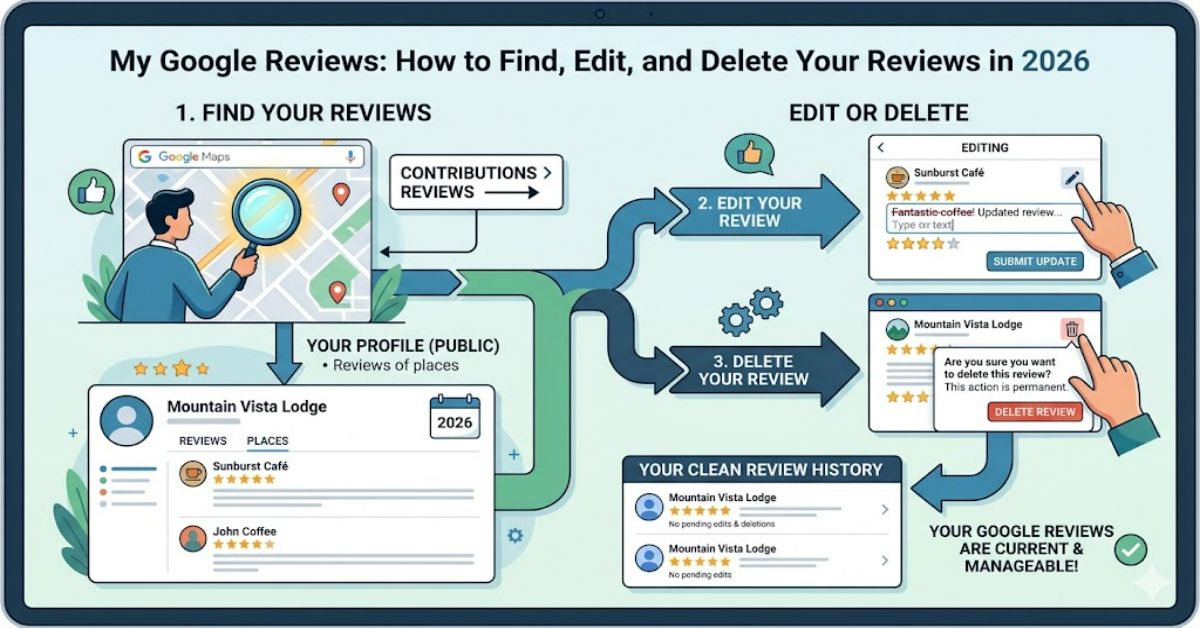
If you’re searching for my google reviews, you’re usually trying to do one of three things: view reviews you’ve written, edit a previous review, or remove one entirely. Fortunately, Google provides a straightforward way to manage review activity through Google Maps and your Contributions profile.
The fastest method is to visit the Google Maps Contributions page while signed into your Google account. From there, you can view every review you’ve published, update star ratings, add new photos, edit written feedback, or delete reviews you no longer wish to keep.
The process differs slightly depending on whether you’re using a desktop browser, an Android device, an iPhone, or managing a business profile. Customers generally access their review history through Google Maps, while business owners monitor incoming customer reviews through their Google Business Profile dashboard.
Online reviews have become one of the most influential forms of digital word-of-mouth. A single review can influence purchasing decisions, local search rankings, and business reputation. Because of that influence, understanding how Google stores, displays, and manages reviews is increasingly important.
This guide explains exactly how review management works, where to find your contribution history, common issues users encounter, privacy considerations, and what changes may arrive by 2027.
Understanding How Google Reviews Work
Google Reviews are user-generated ratings and comments attached to businesses, locations, attractions, and services listed within Google Maps and Google Search.
When a user leaves feedback, several pieces of information may become publicly visible:
| Review Element | Visible to Public |
| Star rating | Yes |
| Written review | Yes |
| Username | Yes |
| Profile image | Yes (if enabled) |
| Uploaded photos | Yes |
| Review date | Yes |
Reviews become part of a user’s public Google contribution history unless privacy settings or policy actions limit visibility.
Where to Find My Google Reviews
The exact navigation depends on your device.
Desktop Browser
- Sign into your Google account.
- Open Google Maps.
- Click the menu icon.
- Select Your Contributions.
- Open the Reviews tab.
This displays all reviews associated with the signed-in account.
Android Devices
- Open Google Maps.
- Tap your profile picture.
- Select Your Profile.
- Tap Reviews.
iPhone and iPad
- Launch Google Maps.
- Ensure you’re signed in.
- Tap your account photo.
- Open Your Profile.
- Select Reviews.
Viewing Reviews as a Customer vs Business Owner
Many users confuse these two perspectives.
Comparison Table
| User Type | Primary Purpose | Where Reviews Are Managed |
| Customer | View personal reviews written | Google Maps Contributions |
| Business Owner | View customer feedback received | Google Business Profile |
| Marketing Team | Monitor reputation trends | Business Profile Dashboard |
| Multi-location Brand | Manage reviews across locations | Business Profile Manager |
Understanding this distinction prevents one of the most common support issues: searching for personal reviews inside a business dashboard.
How to Edit a Review
Google allows users to modify reviews after publication.
Typical reasons include:
- Updated customer experience
- Changed opinion of a business
- Correction of factual mistakes
- Additional information becoming available
Editing Process
- Open your review history.
- Locate the review.
- Select the three-dot menu.
- Click Edit Review.
- Make changes.
- Save.
Updated reviews typically appear immediately, although indexing may take longer.
How to Delete a Review
Deleting a review permanently removes it from public view.
Removal Steps
- Access your review list.
- Select the review.
- Open the options menu.
- Choose Delete Review.
- Confirm deletion.
Unlike edits, deleted reviews generally cannot be recovered through Google’s user interface.
Why Some Reviews Disappear
Users frequently report missing reviews.
Several explanations exist.
Policy Violations
Google may remove content that violates review policies, including:
- Spam
- Fake engagement
- Offensive content
- Conflicts of interest
- Promotional material
Account Issues
Reviews may not appear if:
- The wrong Google account is being used
- The review is still under moderation
- Google has restricted account activity
Business Listing Changes
Merged, closed, or relocated business listings sometimes affect review visibility.
Real-World Review Management Challenges
Google’s review ecosystem appears simple on the surface but presents practical challenges.
Challenge 1: Multiple Google Accounts
Many users have:
- Personal Gmail accounts
- Work accounts
- Legacy Google accounts
A common issue involves searching for reviews under the wrong login credentials.
Challenge 2: Review History Becomes Difficult to Track
Long-term contributors may accumulate hundreds of reviews over several years.
Locating a specific review becomes increasingly difficult without filtering tools.
Challenge 3: Local Guide Activity
Users participating in Google’s Local Guides programme often publish large volumes of content.
Managing review accuracy becomes more important as contribution counts grow.
Risks and Trade-Offs of Public Reviews
Publishing reviews provides useful consumer information, but there are trade-offs.
Privacy Exposure
Review profiles can reveal:
- Travel habits
- Frequently visited businesses
- Geographic patterns
- Personal preferences
Reputation Management
Written reviews become part of a user’s visible online identity.
Future employers, clients, or business contacts may encounter publicly available contributions.
Permanence
Even after deletion, screenshots and archived references may exist elsewhere online.
Original Insights Most Guides Miss
Insight 1: Review Maintenance Matters
Many users write reviews but rarely revisit them.
Businesses change ownership, service quality improves, and experiences evolve. Periodically reviewing contribution history can improve overall accuracy.
Insight 2: Review Volume Creates Discovery Problems
The more active a contributor becomes, the harder it is to locate specific historical reviews. This becomes particularly noticeable among Local Guides with hundreds of submissions.
Insight 3: Account Fragmentation Creates Confusion
People often believe reviews have disappeared when they are actually attached to another Google account. Maintaining a record of active Google identities reduces this issue.
Structured Review Management Checklist
| Task | Recommended Frequency |
| Check review history | Every 3 months |
| Update outdated reviews | As needed |
| Remove accidental posts | Immediately |
| Verify account access | Twice yearly |
| Review privacy settings | Twice yearly |
| Download account data backup | Annually |
The Future of My Google Reviews in 2027
Several developments may influence how reviews are managed over the next year.
Increased Verification
Google continues investing in spam detection and review authenticity systems to reduce fake engagement.
Stronger AI Moderation
Machine-learning systems are becoming more sophisticated at identifying policy violations, suspicious review patterns, and manipulated content.
Enhanced Business Transparency
Businesses increasingly rely on reviews as a trust signal, making review quality and authenticity more important than simple review volume.
Privacy Expectations
Users are becoming more conscious of how public contribution histories affect their digital footprint. Future platform updates may provide greater control over visibility settings.
While these trends appear likely, implementation timelines remain dependent on Google’s product priorities and regulatory developments.
Key Takeaways
- The Contributions page remains the fastest route to managing review history.
- Review editing is straightforward and available across devices.
- Deleted reviews are generally not recoverable through standard user controls.
- Multiple Google accounts are a common source of confusion.
- Public reviews create both value and privacy considerations.
- Regular review maintenance improves accuracy and credibility.
- AI moderation will likely play a larger role in review management moving forward.
Conclusion
Managing my google reviews is easier than many users realise. Whether you’re correcting an outdated opinion, deleting a review, or simply checking your contribution history, Google Maps provides centralised tools that make the process relatively straightforward.
The most important step is ensuring you’re signed into the correct Google account before searching for your review history. Many reported issues stem from account confusion rather than missing content. Beyond that, understanding how reviews are displayed, moderated, and managed helps users maintain a more accurate and professional online presence.
As online reviews continue to influence purchasing decisions and business reputations, keeping your contribution history organised becomes increasingly valuable. A few minutes spent reviewing past feedback can improve accuracy, protect privacy, and ensure your published opinions continue to reflect your genuine experiences.
FAQ
How do I find my Google reviews quickly?
The fastest method is opening Google Maps, selecting Your Contributions, and navigating to the Reviews section while signed into the correct account.
Can I edit a Google review after posting it?
Yes. Google allows users to update ratings, text, and photos associated with previously published reviews.
Why can’t I see my Google reviews?
Common causes include using the wrong Google account, moderation delays, policy removals, or business listing changes.
Can businesses delete my review?
Businesses cannot directly remove reviews. They may report reviews that they believe violate Google’s policies.
Are deleted Google reviews recoverable?
In most cases, deleted reviews cannot be restored through Google’s standard user interface.
Do Google reviews affect my privacy?
Potentially. Reviews can reveal interests, locations, and activity patterns depending on the information shared publicly.
What happens if Google removes my review?
If a review violates Google’s policies, it may be removed automatically or after review by Google’s moderation systems.
Methodology
This article was prepared using official Google support documentation, Google Maps user guidance, publicly available review-management resources, and analysis of common user-reported issues.
The article focuses on practical review management rather than search-ranking strategy. Product features may change as Google updates Maps, Search, and Business Profile functionality.
Limitations include regional feature differences, account-specific settings, and ongoing platform updates that may alter navigation paths after publication.
Editorial Disclosure: This article was drafted with AI assistance and reviewed and verified by the editorial team at RubbleMagazine.co.uk. All data, citations, and claims should be independently confirmed before publication.
References (APA)
Google. (2025). Find, edit, or delete Google reviews and ratings. Google Help.
Google. (2025). Manage your contributions on Google Maps. Google Maps Help.
Google. (2025). Google Maps Local Guides programme overview. Google Help.
Google. (2025). Prohibited and restricted content policy. Google Business Profile Help.
Google. (2025). Report policy-violating reviews. Google Business Profile Help.