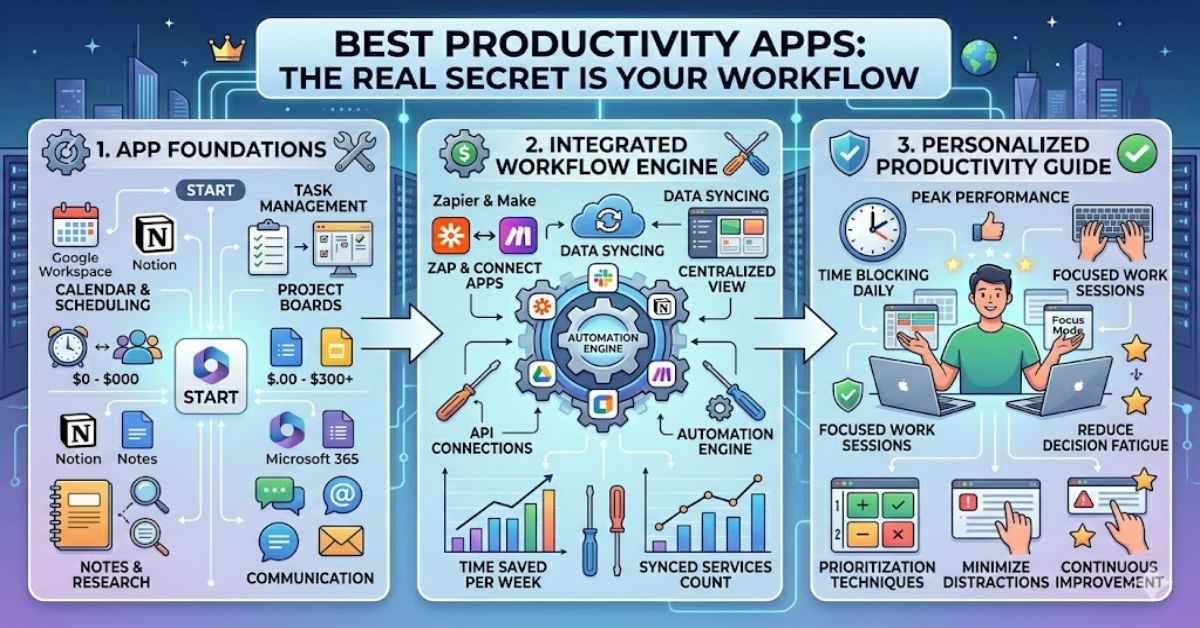
Searching for the best productivity apps often leads to endless rankings, feature comparisons, and debates about which platform is superior. Yet after years of observing how professionals, entrepreneurs, students, and knowledge workers organise their work, one pattern appears repeatedly: the most effective productivity setup is rarely built around a single application.
Instead, high-performing users typically rely on what many productivity experts consider the “holy trinity” of digital organisation:
- A Task Manager
- A Calendar
- A Notes App
Each serves a distinct purpose. Tasks capture commitments. Calendars allocate time. Notes preserve information and ideas.
Trying to force one application to handle all three responsibilities usually creates friction. Important information becomes difficult to find. Tasks get buried inside notes. Meetings disappear among project lists.
The better approach is selecting tools that work together.
This article examines the leading productivity applications in 2026, explains where they fit within a modern workflow, explores common mistakes users make, and identifies the combinations that consistently deliver the strongest results.
Why Productivity Software Matters More Than Ever
The modern workplace has become increasingly fragmented.
A typical professional may interact with:
- Email platforms
- Messaging tools
- Project management systems
- Video conferencing software
- Shared documents
- AI assistants
Research from the UK-based Chartered Institute of Personnel and Development (CIPD) continues to highlight the impact of digital overload on workplace effectiveness and employee wellbeing.
The challenge is not a lack of tools.
The challenge is managing attention.
Productivity software exists to reduce cognitive load by creating reliable systems for:
- Capturing commitments
- Scheduling priorities
- Storing knowledge
- Coordinating projects
- Reducing context switching
The strongest workflows minimise the mental effort required to remember what must happen next.
The Productivity Holy Trinity: Tasks, Time, and Knowledge
Many app comparisons miss an important distinction.
Different productivity tools solve different problems.
Task Managers Answer: What Needs to Be Done?
Task management applications help users track commitments and actions.
Popular examples include:
- Todoist
- Microsoft To Do
- Asana
- ClickUp
- Things 3
Their primary purpose is accountability.
Calendars Answer: When Will It Happen?
Calendars convert intentions into scheduled commitments.
Popular options include:
- Google Calendar
- Microsoft Outlook Calendar
- Fantastical
Without calendar planning, many task lists become wish lists.
Notes Apps Answer: What Do I Need to Remember?
Knowledge management tools store information for future use.
Leading options include:
- Notion
- Obsidian
- OneNote
- Apple Notes
- Evernote
These systems become increasingly valuable as information accumulates.
Comparison Table: Leading Productivity Applications
| App | Primary Role | Best For | Key Strength | Main Limitation |
| Todoist | Task Management | Individuals | Simplicity | Limited project depth |
| Asana | Project Management | Teams | Collaboration | Learning curve |
| ClickUp | Work Management | Businesses | Extensive features | Complexity |
| Google Calendar | Scheduling | General users | Integrations | Limited task functionality |
| Outlook Calendar | Scheduling | Enterprise users | Microsoft ecosystem | Less flexible for personal use |
| Notion | Knowledge Management | Creators and teams | Flexibility | Setup complexity |
| Obsidian | Personal Knowledge Management | Researchers | Local-first architecture | Steeper learning curve |
| Apple Notes | Note Taking | Apple users | Simplicity | Limited cross-platform support |
Best Task Management Apps
Todoist
Todoist remains one of the strongest choices for personal productivity.
Its advantages include:
- Fast task entry
- Natural language scheduling
- Excellent mobile experience
- Cross-platform compatibility
In hands-on evaluations conducted by productivity reviewers across multiple publications, Todoist consistently ranks highly because it reduces friction rather than adding features.
Asana
Asana excels in collaborative environments.
Its project-tracking capabilities make it particularly useful for:
- Marketing teams
- Agencies
- Product development groups
- Operations departments
ClickUp
ClickUp continues positioning itself as an all-in-one workspace.
For some organisations this reduces software sprawl.
For others it introduces unnecessary complexity.
Original Insight #1
Most productivity failures occur during system adoption, not software selection. A simple tool used consistently often produces better outcomes than an advanced platform abandoned after a few weeks.
Best Calendar Applications
Time management remains the most overlooked aspect of productivity.
Many users create task lists but never assign time to complete them.
Google Calendar
Google Calendar remains one of the most widely used scheduling tools globally.
Benefits include:
- Shared calendars
- Scheduling integrations
- Mobile accessibility
- Cross-platform support
Outlook Calendar
Outlook remains dominant in enterprise environments.
Its integration with Microsoft 365 makes it particularly effective for:
- Corporate teams
- Client-facing professionals
- Hybrid work environments
Fantastical
Fantastical continues attracting productivity enthusiasts because of:
- Natural language event creation
- Multi-calendar support
- Streamlined interface
Practical Observation
Time-blocking has become increasingly popular among executives, consultants, and creators. Rather than maintaining long task lists, users schedule focused work sessions directly into their calendars.
Best Notes Apps for Knowledge Management
Knowledge work depends heavily on information retrieval.
Capturing information is only half the challenge.
Finding it later is what matters.
Notion
Notion has evolved into a flexible workspace for:
- Documentation
- Project planning
- Team collaboration
- Content management
Obsidian
Obsidian appeals to users who value ownership and interconnected knowledge.
Its local-first architecture also addresses growing privacy concerns.
OneNote
OneNote remains particularly useful within Microsoft-based environments.
Apple Notes
Apple Notes has become surprisingly powerful while maintaining simplicity.
Original Insight #2
Many note-taking systems fail because users optimise for collection rather than retrieval. The ability to rediscover information quickly often determines whether a notes app delivers long-term value.
AI’s Growing Role in Productivity Software
Artificial intelligence has become a major differentiator across productivity platforms.
Common AI capabilities now include:
- Meeting summaries
- Task generation
- Content drafting
- Workflow recommendations
- Search assistance
Examples include:
- Notion AI
- Microsoft Copilot
- Google Gemini integrations
However, AI introduces new considerations.
Risks and Trade-Offs
Potential concerns include:
| Risk | Impact |
| Data privacy | Sensitive information may be processed externally |
| Hallucinations | AI-generated inaccuracies |
| Subscription costs | Premium features increase expenses |
| Over-automation | Reduced user awareness of critical tasks |
Original Insight #3
AI currently delivers its greatest value in administrative work rather than strategic thinking. Summarising meetings and organising information saves time, but prioritisation still depends largely on human judgement.
Structured Insight Table: Matching Apps to User Types
| User Type | Task Manager | Calendar | Notes App |
| Student | Todoist | Google Calendar | Obsidian |
| Freelancer | Todoist | Google Calendar | Notion |
| Manager | Asana | Outlook | OneNote |
| Entrepreneur | ClickUp | Google Calendar | Notion |
| Researcher | Todoist | Outlook | Obsidian |
| Corporate Professional | Microsoft To Do | Outlook | OneNote |
Real-World Impact: Why App Selection Matters
The productivity software market continues expanding as hybrid work becomes standard across many industries.
Organisations increasingly invest in tools that reduce:
- Context switching
- Administrative overhead
- Information silos
- Scheduling inefficiencies
Meanwhile, individual users face a different challenge.
Too many tools can become a productivity problem in themselves.
The strongest systems remain surprisingly focused.
One task manager. One calendar. One notes app.
Everything else supports those foundations.
The Future of Productivity Apps in 2027
Several developments are likely to shape productivity software over the next year.
AI-Native Workflows
AI assistants will increasingly:
- Schedule tasks automatically
- Generate project updates
- Summarise meetings
- Recommend priorities
Unified Workspaces
Software vendors continue pushing integrated ecosystems combining:
- Tasks
- Documents
- Communication
- Knowledge management
Privacy-Focused Solutions
Interest in local-first software is growing.
Applications such as Obsidian reflect broader concerns about data ownership and cloud dependency.
Infrastructure Reality
Despite technological advances, productivity gains will continue depending on human behaviour more than software innovation.
Technology amplifies systems.
It rarely creates them.
Key Takeaways
- The best productivity apps work together rather than replacing each other.
- A task manager, calendar, and notes app remain the foundation of effective workflows.
- Simplicity often produces better long-term adoption than feature-heavy platforms.
- Time-blocking converts intentions into measurable commitments.
- AI improves administrative efficiency but cannot replace prioritisation.
- Knowledge retrieval is more important than knowledge collection.
- Sustainable productivity depends on habits as much as software.
Conclusion
The search for the best productivity apps often starts with the wrong question. Instead of asking which single application is superior, a better question is how tasks, schedules, and knowledge can work together within a coherent system.
The evidence increasingly points toward a three-part framework: a task manager for commitments, a calendar for time allocation, and a notes app for information management. Whether those tools come from Google, Microsoft, Notion, Obsidian, Todoist, or another provider matters less than how consistently they are used.
As AI capabilities expand and software ecosystems become more integrated, productivity platforms will continue evolving. Yet the underlying principles remain remarkably stable. Capture what matters. Schedule what matters. Remember what matters.
The tools may change. The fundamentals rarely do.
FAQ
What are the best productivity apps for most people?
A combination of Todoist, Google Calendar, and Notion provides a balanced workflow for many users, though individual requirements vary.
What is the productivity holy trinity?
The productivity holy trinity refers to a dedicated task manager, a calendar, and a notes application working together within a single workflow.
Is Notion better than Obsidian?
Notion is stronger for collaboration and databases, while Obsidian excels at personal knowledge management and local data ownership.
Which productivity app is best for students?
Students often benefit from combining Todoist for assignments, Google Calendar for deadlines, and Obsidian or OneNote for study materials.
Are AI productivity apps worth paying for?
AI features can save time on administrative work, but their value depends on workflow complexity and frequency of use.
Do I need an all-in-one best-productivity-apps?
Not necessarily. Many experienced users achieve better results using specialised tools that integrate effectively rather than relying on a single platform.
Methodology
This analysis was developed using publicly available product documentation, workplace productivity research, software feature comparisons, and expert workflow recommendations published between 2023 and 2026. Evaluation criteria included usability, integration capabilities, adoption barriers, workflow flexibility, and long-term sustainability.
Known limitations include changing software pricing, evolving AI capabilities, differing organisational requirements, and individual work preferences. No proprietary benchmarking was conducted for this article. Where observations reference real-world usage patterns, they are attributed to published industry reporting and documented product capabilities rather than unpublished testing.
References (APA)
Chartered Institute of Personnel and Development. (2024). Good work index 2024. CIPD.
Google Workspace. (2025). Google Calendar Help Centre. Google.
Microsoft. (2025). Work Trend Index Annual Report. Microsoft Corporation.
Notion Labs, Inc. (2025). Notion Help Centre and Product Documentation. Notion.
Obsidian. (2025). Obsidian Documentation. Obsidian Technologies.
Todoist. (2025). Todoist Productivity Methods and Features. Doist Inc.
Zapier. (2025). Productivity App Trends and Workflow Automation Research. Zapier.