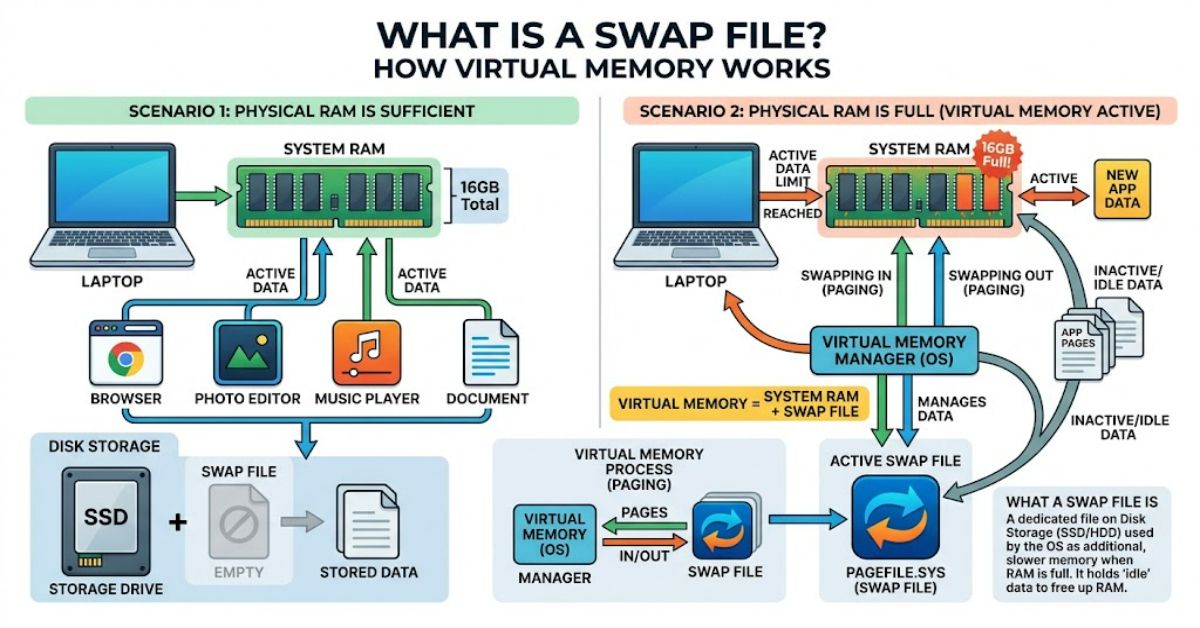
What is a swap file? It is a dedicated file on a computer’s hard drive or SSD that acts as virtual memory to extend physical RAM. When a system needs more memory than is readily available in RAM, the operating system can move less-active memory pages from RAM to storage, freeing physical memory for applications and processes that need it.
The basic idea is straightforward, but the terminology varies between operating systems. Linux commonly refers to swap space and can use a regular file as that space. Windows uses a page file, typically named pagefile.sys, for part of its virtual-memory system. Microsoft explains that Windows can move pages between physical memory and the paging file as it manages virtual address spaces.
Swap therefore provides a safety margin rather than magically turning an SSD into RAM. Storage has much higher latency and lower memory-access performance than physical RAM. If a computer relies heavily on swapping, applications can become noticeably slower even though the system remains operational.
How a swap file works
Modern operating systems divide memory into pages and manage which pages remain in physical RAM. When RAM becomes constrained, the operating system can identify pages that are less immediately useful and move them to a designated storage area.
On Linux, that storage can be a swap file. The swapon utility activates a file or block device for paging and swapping, while swapoff disables it.
Windows uses comparable principles through its paging system. Microsoft describes the page file as storage that can hold pages moved out of physical memory, allowing the operating system to reclaim RAM for other work.
| Component | Physical RAM | Swap or page file |
| Location | Memory modules | SSD or hard drive |
| Primary purpose | Active working memory | Additional virtual-memory capacity |
| Speed | Very fast | Much slower |
| Persistence | Volatile | Stored on disk while allocated |
| Main limitation | Limited capacity | Storage latency and capacity |
The important distinction is that swap expands available virtual-memory capacity, not the computer’s physical RAM capacity.
Why computers need swap
A system can encounter situations where applications collectively request more memory than the available RAM. Without sufficient virtual-memory resources, memory allocation can fail and applications or system processes may be terminated.
Linux documentation describes swap as temporary storage for inactive processes and data when physical memory is full. Red Hat also emphasises that swap can help prevent out-of-memory conditions but should not be considered a substitute for additional physical RAM.
This creates one of swap’s most useful roles: resilience.
For example, a computer with 8GB of RAM may run a browser with many tabs, a code editor, background services and a virtual machine. If memory demand suddenly rises, the operating system can move less-active pages to swap, leaving RAM available for immediately active workloads.
That does not mean the computer will perform as though it had 16GB of RAM. Instead, swap can give the operating system more room to manage memory pressure.
Swap file versus swap partition
Linux systems can use either a swap file or a dedicated swap partition.
A swap partition reserves an entire disk partition for swap. A swap file reserves a normal filesystem file for the same general purpose. Modern Linux distributions support swap files, making them useful when administrators want additional swap without repartitioning a disk. Red Hat’s current documentation describes swap files as a way to add swap space without modifying existing storage partitions.
| Option | Main advantage | Main limitation |
| Swap file | Flexible and easy to resize | Filesystem-specific considerations |
| Swap partition | Dedicated swap area | Less flexible once disk is partitioned |
| Multiple swap areas | Can provide additional capacity | Adds configuration complexity |
Filesystem behaviour matters. The Linux swapon documentation warns that swap files containing holes may be rejected, and special considerations apply to copy-on-write filesystems such as Btrfs.
This is an important practical detail: creating an ordinary empty file is not automatically enough to make it valid swap space.
Does swap make a computer faster?
Usually, no.
Swap can help a system remain usable when RAM is exhausted, but accessing storage is much slower than accessing RAM. Red Hat explicitly describes swap as slower than physical memory and advises optimising physical memory use first.
The practical benefit is therefore better described as memory capacity management rather than performance enhancement.
A computer that occasionally uses a small amount of swap may operate normally. A system constantly moving large quantities of memory between RAM and storage can experience severe slowdowns. This behaviour is often described as thrashing.
That creates a useful diagnostic distinction:
- Some swap usage: Not necessarily a problem.
- Frequent heavy swapping: Often indicates significant memory pressure.
- Persistent performance degradation: May justify investigating RAM capacity, workload demands and memory-consuming applications.
How much swap should you have?
There is no universal modern formula that works for every computer.
Older guidance sometimes recommended setting swap as a fixed multiple of RAM. Current Red Hat documentation instead explains that recommended swap depends more on system workload, especially because modern computers can contain very large amounts of RAM.
The requirement can also change if hibernation is used, because hibernation has different storage requirements from ordinary memory-pressure management.
| Workload | Swap planning consideration |
| Basic desktop | Moderate safety margin may be sufficient |
| Development workstation | Consider peak application and build workloads |
| Server | Base sizing on workload and memory behaviour |
| Virtualisation host | Account for guest memory requirements |
| Hibernating system | Consider hibernation-specific requirements |
The useful question is therefore not simply “How much RAM do I have?” but “How does this system actually use memory?”
Risks and trade-offs
Swap has several limitations.
First, it consumes storage capacity. A large swap file can occupy significant SSD or hard-drive space.
Second, heavy swapping can reduce responsiveness. The computer may remain technically operational while applications become sluggish because memory pages repeatedly move between RAM and storage.
Third, configuration matters. Linux requires appropriate preparation before a swap file can be activated, and filesystem characteristics can affect compatibility.
Windows has its own considerations. Microsoft notes that automatic page-file growth can, in some circumstances, contribute to memory-allocation failures when the file begins small and must grow dynamically.
These are practical reasons not to treat swap as an automatic cure for insufficient RAM.
The Future of Swap Files in 2027
By 2027, swap files are likely to remain relevant because operating systems still need mechanisms for managing memory pressure across desktops, servers, containers and virtualised environments.
The direction of development is unlikely to be about making storage equivalent to RAM. Instead, operating systems will continue improving how memory is allocated, compressed, reclaimed and moved between different storage and memory tiers.
Linux documentation already reflects increasingly sophisticated swap configurations, including filesystem-specific support and different swap areas. Windows similarly continues to manage page-file behaviour dynamically according to system requirements.
The underlying constraint remains unchanged: storage capacity can supplement memory management, but its latency means physical RAM remains essential for high-performance workloads.
Key Insights
- Swap is primarily a capacity and stability mechanism, not a performance upgrade.
- A swap file can add virtual-memory capacity without repartitioning a Linux disk.
- Windows page files perform a related role within its virtual-memory architecture.
- Heavy swap activity is more informative than swap capacity alone when diagnosing memory pressure.
- Modern swap sizing should reflect workload rather than rely blindly on old RAM-multiplier rules.
- Filesystem behaviour can affect whether a Linux swap file works correctly.
Methodology
This article was prepared using operating-system documentation from Microsoft, Red Hat and Ubuntu. The sources were selected to establish how virtual memory, paging, swap files and page files operate in current operating systems.
No original benchmark or hands-on system test was conducted for this article. Performance observations therefore reflect documented operating-system behaviour rather than an independent laboratory measurement. Swap performance varies according to RAM capacity, storage technology, filesystem, workload and operating-system configuration.
Conclusion
A swap file is best understood as an extension of an operating system’s memory-management system rather than a replacement for RAM. When physical memory becomes constrained, the operating system can move less-active pages to storage and reclaim RAM for more immediate tasks.
The approach can improve system resilience and help prevent memory exhaustion, particularly on machines with limited RAM. However, storage is substantially slower than physical memory, so frequent or sustained swapping can result in poor responsiveness.
Windows implements similar functionality through its page-file system, while Linux can use dedicated swap partitions or swap files. The choice and size depend on the operating system, filesystem, workload and, in some cases, requirements such as hibernation.
The most useful way to think about swap is therefore as a buffer. It gives the operating system additional room to manage memory, but it does not change the fundamental performance difference between RAM and storage.
FAQ
What is a swap file used for?
A swap file provides storage space that an operating system can use for virtual memory. It allows less-active memory pages to be moved out of RAM when physical memory becomes constrained.
Is a swap file the same as virtual memory?
Not exactly. Virtual memory is the broader memory-management system. A swap file is one storage mechanism that can support virtual-memory operations.
Is swap file RAM?
No. Swap uses storage rather than physical memory modules. It can increase available virtual-memory capacity, but it is significantly slower than RAM.
Does Windows use swap files?
Windows primarily uses a paging file rather than the Linux terminology of a swap file. The page file supports Windows virtual-memory management.
Is a swap file necessary on Linux?
Not every Linux system requires a swap file, but swap can provide useful protection against memory exhaustion and support workloads that temporarily exceed available RAM.
Can a swap file slow down a computer?
Heavy swapping can slow a computer substantially because storage access is much slower than RAM access. Occasional swap use does not automatically indicate a performance problem.
References
Microsoft. (2021). Virtual address space and physical storage. Microsoft Learn.
Microsoft. (2026). Memory allocation errors can be caused by slow page file growth. Microsoft Learn.
Microsoft. (2019). PageFile. Microsoft Learn.
Red Hat. (2025). Getting started with swap. Red Hat Enterprise Linux 10 Documentation.
Ubuntu. (2025). swapon, swapoff: Enable/disable devices and files for paging and swapping. Ubuntu Manpages.
AI Disclosure: This article was drafted with AI assistance and should be reviewed by a human editor before publication, with technical claims and references independently verified against the original sources.