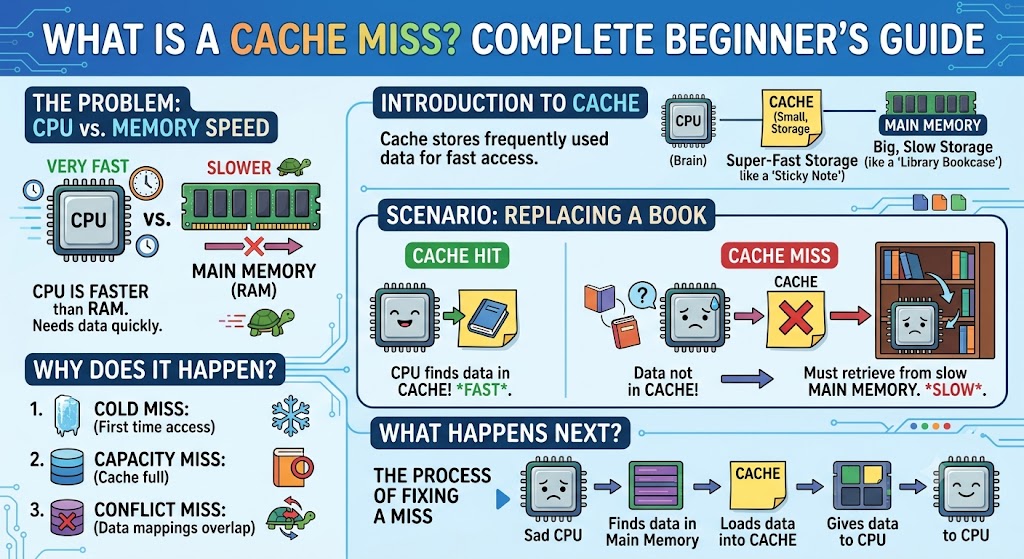
If you’ve ever wondered what is a cache miss, the answer is straightforward: it occurs when a computer system tries to read or write data from a cache, but the requested information is not stored there. Since the cache does not contain the required data, the system must retrieve it from slower main memory, storage, or a database before continuing its task.
Although this process happens in milliseconds—or even nanoseconds—it has a significant impact on overall performance. Modern processors, web browsers, operating systems, and cloud services all rely heavily on caching to speed up repeated operations. When data is found in the cache, the system responds quickly. When it isn’t, performance slows because the processor must wait for information from a slower source.
Understanding cache misses is important for software developers, IT professionals, database administrators, and anyone interested in how computers achieve high performance.
What Is Cache Memory?
Cache memory is a small, high-speed storage area that temporarily holds frequently used data or instructions. It exists because accessing data from RAM or a database is much slower than accessing it from cache.
For example, a processor may repeatedly use the same instructions while running a program. Instead of retrieving them from RAM every time, it stores them in cache for faster access.
Common types of cache include:
- CPU cache (L1, L2, and L3)
- Web browser cache
- Database cache
- Application cache
- Content Delivery Network (CDN) cache
Each type serves the same purpose: reducing access time and improving performance.
How a Cache Miss Works
The process can be simplified into four steps:
| Step | What Happens |
| 1 | The system requests data. |
| 2 | The cache checks whether the data exists. |
| 3 | If unavailable, a cache miss occurs. |
| 4 | The system retrieves the data from slower memory and updates the cache. |
Once the missing data has been loaded into the cache, future requests for the same information are much faster.
Types of Cache Misses
Not every cache miss happens for the same reason. Computer architects generally classify them into three main categories.
Compulsory Cache Miss
Also known as a “cold miss,” this occurs when data is accessed for the first time. Since it has never been stored in cache before, the system must retrieve it from main memory.
This type cannot be completely avoided because every new piece of data must be loaded at least once.
Capacity Cache Miss
A capacity miss occurs when the cache is too small to store all the required data.
As new information enters the cache, older information is removed. If that older data is needed again shortly afterward, another cache miss occurs.
Increasing cache size can help reduce capacity misses.
Conflict Cache Miss
Conflict misses occur when multiple pieces of data compete for the same cache location due to cache organisation.
Even if enough cache space exists, poor placement can cause useful data to be replaced unnecessarily.
Hardware designers use more advanced cache structures to minimise these conflicts.
Cache Hit vs. Cache Miss
Understanding the difference between a cache hit and a cache miss makes the concept much easier.
| Cache Hit | Cache Miss |
| Data found immediately | Data not found |
| Fast response | Slower response |
| No memory lookup required | Requires access to slower memory |
| Better performance | Increased latency |
A high cache hit rate generally indicates an efficient system.
Why Cache Misses Matter
Cache misses affect performance in almost every modern computing environment.
CPU Performance
Processors execute billions of instructions every second. If required data isn’t available in cache, the processor must pause while waiting for slower memory access.
Even tiny delays become significant when repeated millions of times.
Database Queries
Databases often cache frequently requested records.
When a requested record is missing from cache, the database performs additional disk or storage operations, increasing query time.
Large web applications carefully tune their database caches to reduce these delays.
Web Browsing
Your browser stores images, CSS files, JavaScript, and other website resources in cache.
If cached copies are unavailable, everything must be downloaded again from the server, increasing page loading time.
Common Causes of Cache Misses
Several factors contribute to cache misses.
- Large datasets exceeding cache capacity
- Poor software optimisation
- Random memory access patterns
- Frequent application updates
- Cache expiration policies
- High user traffic causing cache eviction
Understanding these causes helps engineers improve application performance.
Reducing Cache Misses
Although cache misses cannot be eliminated entirely, they can often be reduced through optimisation.
Some common strategies include:
- Increasing cache size where practical
- Improving memory access patterns
- Using efficient algorithms
- Optimising database indexes
- Preloading frequently accessed information
- Implementing intelligent cache replacement policies
Modern processors also include sophisticated prediction techniques that attempt to anticipate future memory requests.
Real-World Example
Imagine an online shopping website during a holiday sale.
Popular product pages receive thousands of visits every minute. Product images, descriptions, and pricing information are stored in cache so visitors receive pages quickly.
Suppose a customer requests a product that hasn’t been viewed recently. Because the information is no longer stored in cache, the server retrieves it from the database. This creates a cache miss.
The first customer experiences a slightly slower response, but the requested data is then cached, allowing later visitors to access the same product much faster.
This example demonstrates why caching is critical for websites handling large numbers of users.
The Future of Cache Technology in 2027
By 2027, cache technology is expected to become even more intelligent. Advances in processor design, artificial intelligence, and cloud infrastructure are enabling systems to predict user behaviour and preload frequently accessed data before it is requested.
Cloud providers are also expanding distributed caching systems that reduce latency across multiple geographic regions. Meanwhile, AI-assisted optimisation tools are helping developers identify inefficient memory access patterns earlier in the software development process.
Although hardware performance continues to improve, efficient caching will remain one of the most effective ways to reduce latency and improve user experience.
Key Takeaways
- A cache miss occurs when requested data is unavailable in cache memory.
- Cache misses increase latency because slower memory must be accessed.
- The three primary types are compulsory, capacity, and conflict misses.
- High cache hit rates improve processor, database, and application performance.
- Smart software design can significantly reduce unnecessary cache misses.
Conclusion
Understanding what is a cache miss provides valuable insight into how modern computers deliver fast performance. Caches exist to minimise the time required to access frequently used information, but whenever requested data is unavailable, the system must retrieve it from a slower source. That additional step increases latency and can affect everything from processor efficiency to website responsiveness.
Fortunately, hardware manufacturers and software developers continually improve caching strategies through larger caches, smarter algorithms, and better memory management. While cache misses cannot be eliminated completely, reducing their frequency leads to faster applications, improved user experiences, and more efficient computing systems.
Frequently Asked Questions
What is a cache miss in simple terms?
A cache miss happens when requested data is not available in cache memory, forcing the system to retrieve it from slower storage.
Why are cache misses slow?
They require access to slower memory or storage devices instead of high-speed cache memory, increasing response time.
Can cache misses be prevented?
Not entirely. However, better software design, larger caches, and efficient memory access patterns can reduce them.
What is the difference between a cache hit and a cache miss?
A cache hit finds the required data immediately in cache, while a cache miss requires retrieval from slower memory.
Which systems use caching?
Caching is used in CPUs, operating systems, databases, web browsers, cloud platforms, mobile apps, and content delivery networks.