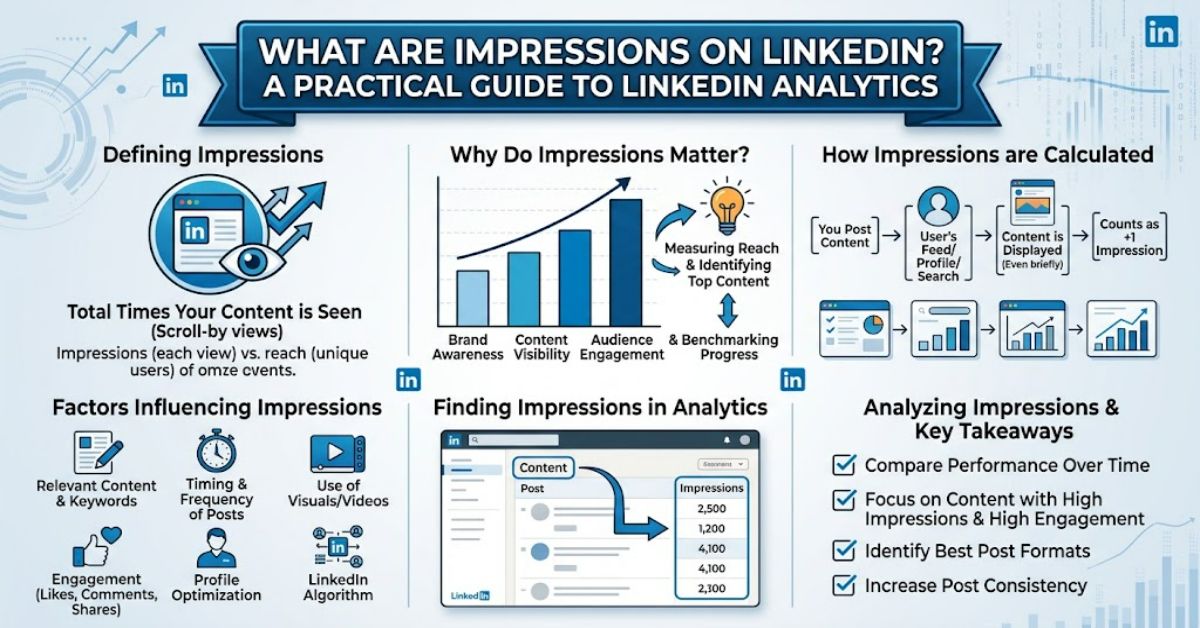
What are impressions on LinkedIn? They are the number of times your post was shown on LinkedIn. The metric counts displays rather than unique people, so one person seeing the same post several times can contribute multiple impressions. LinkedIn states that its post analytics figures are estimates and may not always be precise.
That distinction matters because impressions are often misunderstood as a direct measure of audience size. They are not. A post with 10,000 impressions does not necessarily mean 10,000 different professionals viewed it.
LinkedIn also reports members reached, which is an estimated count of distinct members and Pages that saw a post. Repeat views are excluded from that figure.
For marketers, recruiters, consultants, job seekers and business owners, this makes impressions useful as a distribution metric. They help show how frequently content appeared in LinkedIn users’ feeds, but they need to be read alongside other metrics to understand whether that exposure produced meaningful results.
How LinkedIn Impressions Work
LinkedIn defines impressions as the number of times a post is shown on LinkedIn. The platform applies this measurement across several content formats, including text posts, images, videos, events, polls and articles.
For example, imagine that you publish a post about workplace technology. If 1,000 distinct members see it once, the post may record approximately 1,000 impressions. If some of those members see it again, the impression count can rise without an equivalent increase in unique viewers.
This creates the first important analytical distinction:
| Metric | What it measures | Repeat views included? |
| Impressions | Times content was shown | Yes |
| Members reached | Distinct members and Pages reached | No |
| Reactions | Reactions received | Not applicable |
| Comments | Comments received | Not applicable |
| Reposts | Times content was reposted | Not applicable |
| Link visits | Clicks on external links | Yes |
LinkedIn explicitly describes members reached as an estimate and says repeat views are not included.
Impressions vs Reach: Why the Difference Matters
A common mistake is treating impressions and reach as interchangeable.
Suppose a post generates 8,000 impressions and reaches 3,000 members. The simplest interpretation is that the content was displayed more times than the number of unique viewers. That does not automatically mean the repeated exposure was positive or negative.
The relationship between the two figures can instead provide useful context.
| Example | Impressions | Members reached | What it suggests |
| A | 2,000 | 1,900 | Broad distribution with limited repeat exposure |
| B | 5,000 | 2,000 | More repeated exposure |
| C | 10,000 | 8,500 | High distribution across a relatively broad audience |
These examples are illustrative rather than LinkedIn benchmarks. Their purpose is to show why the raw impression total should not be analysed alone.
LinkedIn has also introduced in-network and out-of-network discovery measures in its post analytics. In-network impressions come from followers or connections, while out-of-network impressions come from people who do not follow or connect with you.
That distinction provides a useful additional layer: a post can generate substantial exposure beyond an existing professional network.
What Do High LinkedIn Impressions Mean?
High impressions generally indicate that LinkedIn displayed the content frequently. They do not, by themselves, prove that a post was successful.
This is one of the most useful practical insights from reading the metric correctly. A post can attract thousands of impressions while producing relatively few comments, reactions, profile visits or link clicks. Conversely, a smaller post can reach a highly relevant professional audience and produce stronger business results.
LinkedIn’s analytics therefore include several categories beyond discovery. These include profile activity, social engagement, link engagement and audience demographics.
For a consultant, profile viewers and followers gained may matter more than raw exposure. For a publisher, link visits may be more useful. For a recruiter, audience demographics can help determine whether the content reached the intended professional group.
The metric needs to be interpreted according to the objective.
How to Check LinkedIn Impressions
LinkedIn currently allows members to view analytics for individual posts.
On desktop, LinkedIn’s documented process is to open Me, go to Posts & Activity, select the relevant content type and then select the impressions figure or the analytics option. On mobile, members can access their profile, open the Activity section and select the relevant post or analytics view.
LinkedIn also provides combined post analytics. Members can switch between impressions and engagements, select date ranges and review top-performing posts.
One important limitation is that LinkedIn describes the displayed numbers as estimates. Therefore, small changes should not automatically be treated as precise measurements of audience behaviour.
Three Practical Insights About Impressions
1. Exposure is not the same as audience size.
Because impressions are non-unique, the figure should not be presented as the number of people who saw a post.
2. Distribution quality matters.
LinkedIn now distinguishes in-network and out-of-network impressions. This can help creators understand whether content is circulating mainly among existing connections or reaching beyond them.
3. Context changes the meaning of the number.
A high impression count accompanied by profile visits, followers, comments or link visits tells a different story from high impressions with little measurable response.
These distinctions are more useful than setting a universal threshold for what counts as a “good” impression total.
The Future of LinkedIn Impressions in 2027
LinkedIn’s current analytics direction points towards more granular interpretation of content distribution rather than reliance on one headline number. Its analytics system already combines discovery, engagement, profile activity, link engagement and demographic information.
By 2027, creators are likely to continue placing more emphasis on audience relevance and downstream outcomes. However, specific future features cannot be stated as fact unless LinkedIn formally announces them.
The infrastructure already available suggests that impression data is most useful when combined with information about who encountered the content and what happened afterwards.
Key Takeaways
- Impressions count displays, not unique viewers.
- One person can contribute multiple impressions.
- Members reached is the closer metric to unique audience size.
- LinkedIn’s figures are estimates and may not be perfectly precise.
- In-network and out-of-network data add useful distribution context.
- Engagement and profile activity help explain whether exposure produced a meaningful response.
- There is no universal impression number that defines a successful LinkedIn post.
Conclusion
Understanding what are impressions on LinkedIn starts with one simple distinction: impressions measure displays, not unique people. LinkedIn’s current documentation confirms that the metric represents the number of times content was shown, while members reached estimates the number of distinct members and Pages that saw it.
That difference makes impressions valuable, but incomplete. They are best treated as a distribution signal rather than a standalone measure of content quality.
For meaningful analysis, compare impressions with reach, engagement, profile activity, link visits and audience characteristics. Looking at these metrics together provides a clearer picture of whether content was simply displayed widely or actually reached the people who mattered.
FAQ
What are impressions on LinkedIn?
LinkedIn impressions are the number of times your post was shown on LinkedIn. They are not a unique-person count, so repeat views can contribute additional impressions.
What is the difference between impressions and LinkedIn reach?
Impressions count displays, while members reached estimates the number of distinct members and Pages that saw your content. Repeat views are excluded from members reached.
Can one person create multiple LinkedIn impressions?
Yes. Impressions are non-unique. If the same member sees your content more than once, those displays can contribute to the impression total.
Are LinkedIn impressions accurate?
LinkedIn describes its post analytics numbers as estimates and says they may not be precise. They are best used for identifying performance patterns rather than treating every figure as an exact audience measurement.
Where can I see my LinkedIn post impressions?
You can open your post analytics through LinkedIn’s Posts & Activity area on desktop or through your profile’s Activity section on mobile.
Do impressions mean someone engaged with my post?
No. An impression means the content was shown. It does not necessarily mean that the viewer reacted, commented, reposted, saved or clicked.
Methodology
This article was prepared using current LinkedIn Help documentation, including its definitions of impressions, members reached, discovery metrics, combined post analytics and analytics access procedures. LinkedIn documentation was prioritised because the platform itself is the primary source for explaining how its current metrics are defined.
No independent LinkedIn account testing or controlled performance experiment was conducted for this article, so no invented firsthand testing results are presented. The numerical examples are illustrative rather than platform benchmarks. LinkedIn also states that analytics figures are estimates, which limits the precision of conclusions drawn from small changes.
A balanced interpretation is therefore used: impressions are useful for measuring content distribution, but they should be assessed alongside reach, engagement and other outcome metrics.
References
LinkedIn. (2026). Post analytics for your content. LinkedIn Help.
LinkedIn. (2026). View post analytics for your content. LinkedIn Help.
LinkedIn. (2026). View your creator analytics. LinkedIn Help.
LinkedIn. (2026). Analytics for LinkedIn members. LinkedIn Help.
LinkedIn. (2026). Analytics and tools on LinkedIn. LinkedIn Help.