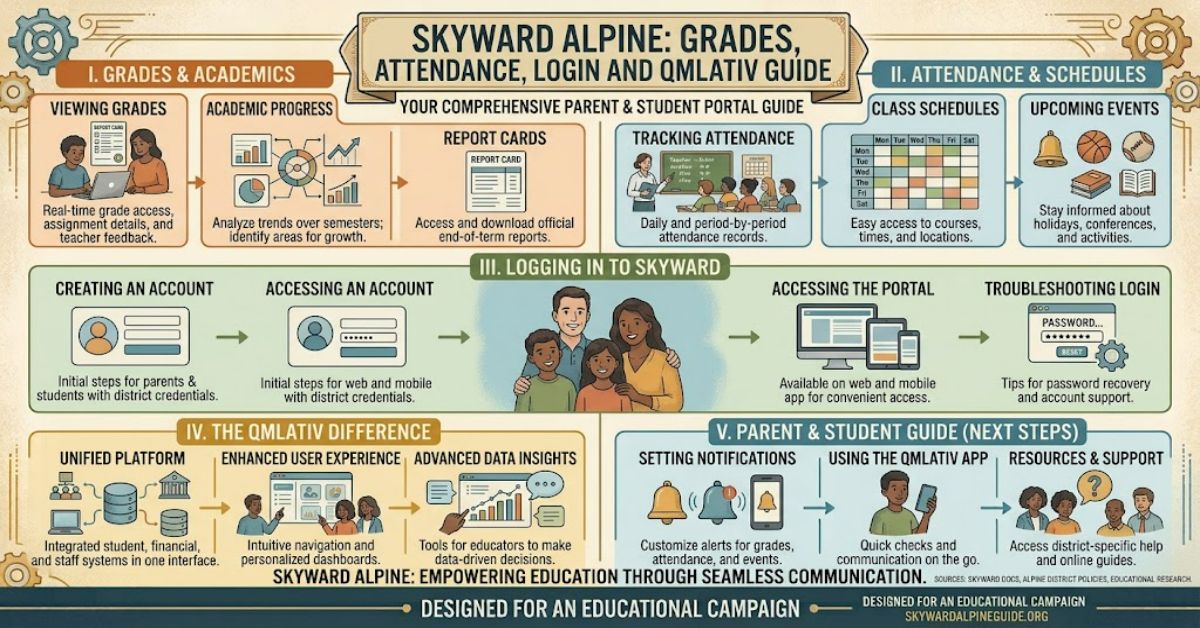
Skyward Alpine refers to the Skyward student information system used by Alpine School District in Utah. For students and parents, it provides a central place to view academic records, attendance information, class schedules and other school-related information.
The platform has also undergone a major change in 2026. After 18 years using Skyward SMS 2.0, Alpine School District announced that it would move to Skyward Qmlativ, commonly called Skyward Q or simply Q. The district scheduled the new platform to go live on 27 July 2026.
This change matters because users may see a different interface or need to reinstall the Skyward mobile application. Alpine also stated that existing usernames, passwords and schedules would remain associated with users during the transition, although some information became available on different dates.
Understanding the difference between the older SMS 2.0 platform and Qmlativ makes it easier for families to find grades, check attendance and deal with login problems.
What Is Skyward Alpine?
Skyward Alpine is not a separate software product created specifically for Alpine School District. It is the district’s implementation of Skyward’s student information technology.
A student information system, or SIS, stores and organises information connected with a student’s school experience. Depending on the permissions assigned to an account, this can include grades, attendance, schedules, enrolment details, test scores and school communications.
Skyward’s Qmlativ platform provides Family Access features for grades, attendance, schedules, notifications and test scores.
For families, the important point is that the system acts as a digital window into information already maintained by the school.
Skyward Alpine and the Move to Qmlativ
Alpine School District’s 2026 upgrade is one of the most important changes users need to understand.
| Feature | Previous system | New system |
| Platform | Skyward SMS 2.0 | Skyward Qmlativ |
| Alpine usage | About 18 years | Introduced district-wide in 2026 |
| Student information | Supported | Supported |
| Grades | Available | Available |
| Attendance | Available | Available |
| Schedules | Available | Available |
| Mobile access | Skyward app | Updated Qmlativ-compatible app |
| Interface | Older Skyward design | Newer Qmlativ interface |
Skyward describes Qmlativ as its next-generation education management platform. It combines student information functions with broader administrative capabilities and uses a more modern interface.
Alpine’s own communications described the upgrade as an improvement to navigation, visual design and usability.
What Can Students and Parents Check?
The main purpose of Skyward Alpine is access to school information without having to contact the school office for every routine question.
| Information | Typical use |
| Grades | Monitor academic performance |
| Attendance | Check absences and tardies |
| Schedule | View current classes |
| Notifications | Read school-related messages |
| Test scores | Review available assessment information |
| Course requests | Participate in future course planning |
| Enrolment | Complete or update student information |
Skyward’s Qmlativ Family Access resources specifically identify grades, attendance, schedules, messages, notifications and test scores as key student-facing functions.
This creates a useful advantage for families: academic information can be checked regularly rather than only at formal reporting periods.
How to Handle Skyward Alpine Login Problems
A common mistake is assuming that Skyward itself controls every login issue. It does not.
Skyward explains that each school district has its own login portal and security settings. If a user cannot recover an account through the available password-reset process, the school or district technology office normally needs to assist.
For Alpine families, the safest approach is therefore:
- Use the official Alpine School District Skyward access point.
- Check that the username and password are entered correctly.
- Use the password-recovery option if available.
- Avoid repeatedly guessing passwords.
- Contact the school office if the account remains inaccessible.
During the 2026 Qmlativ migration, Alpine also advised users to reinstall the Skyward application after the new platform went live.
Why Grades or Attendance May Not Appear
A missing grade does not necessarily indicate a technical problem.
Teachers control when many grades and assignments are entered into the system. Skyward states that it does not determine when teachers post grades, schedules or assignments.
This creates an important distinction:
System availability means the account and platform are working.
Data availability means the school has actually entered and published the information.
The two are not the same.
Attendance information can also depend on when teachers or administrative staff record and process attendance. A delay therefore does not automatically mean that the student’s record is incorrect.
The Practical Impact of Qmlativ
The move to Qmlativ is more than a visual redesign. Skyward describes Qmlativ as a broader education management system with tools for student records, scheduling, attendance, grading and other administrative processes.
One useful development is stronger role-based access. Skyward has introduced features that allow staff to see student information according to their assigned responsibilities, helping reduce unnecessary exposure of student records.
For parents and students, however, the most visible difference is likely to be the interface and navigation rather than the underlying administrative architecture.
Three Important Insights
1. The 2026 change affects workflow as well as appearance.
Families may need to adjust to different menus, application behaviour and account procedures.
2. A new interface does not mean new academic records.
The migration changes the technology platform, while student information remains part of the district’s information-management process.
3. Login problems are often local rather than global.
Because school districts control their own access arrangements, the school office or district technology team is often the correct point of contact when standard password recovery fails.
The Future of Skyward Alpine in 2027
The most important development for Skyward Alpine in 2027 will be the continued use and refinement of Qmlativ following Alpine School District’s 2026 migration.
Qmlativ is designed around continued software development rather than a static SIS model. Skyward has continued releasing updates involving dashboards, security, processing lists and other administrative functions.
For families, this could mean a more integrated digital experience across student information, communication and mobile access. However, the usefulness of those improvements will depend on how Alpine configures the system and how consistently schools maintain their data.
Key Takeaways
- Skyward Alpine provides access to important student information.
- Alpine School District transitioned from SMS 2.0 to Qmlativ in July 2026.
- Grades, attendance and schedules remain central functions.
- Missing information may simply mean it has not yet been posted.
- Password problems may require assistance from the school.
- The Qmlativ interface is designed to provide a newer SIS experience.
- Families should treat the school or district as the primary authority for account-specific problems.
Conclusion
Skyward Alpine remains an important digital access point for students and families within Alpine School District, but 2026 marked a major transition in how that information is delivered. After many years with Skyward SMS 2.0, the district moved to Qmlativ, bringing a newer interface and updated student information environment.
For everyday users, the most relevant functions remain straightforward: checking grades, reviewing attendance, viewing schedules and receiving school communications. The main challenge is understanding that the availability of information depends on school processes as well as the technology itself.
As Qmlativ becomes established, users should expect the platform experience to continue developing. The underlying purpose, however, remains the same: providing students, parents, teachers and administrators with organised access to essential educational information.
Frequently Asked Questions
What is Skyward Alpine?
Skyward Alpine is the Skyward student information environment used by Alpine School District for managing and accessing student-related information such as grades, attendance and schedules.
Did Alpine School District switch to Qmlativ?
Yes. Alpine School District moved from Skyward SMS 2.0 to Qmlativ during summer 2026. The district announced that Skyward Q would go live on 27 July 2026.
Can I check grades through Skyward Alpine?
Yes. Grades are one of the main Family Access functions supported by Skyward’s Qmlativ platform.
Can parents see attendance information?
Yes. Family Access provides attendance information, including details about absences and tardies.
What should I do if Skyward Alpine will not let me log in?
Use the password recovery option first. If that does not resolve the problem, contact the relevant Alpine school office because district-level administrators control account access and security settings.
Why are my grades missing from Skyward?
A grade may be missing because the teacher has not yet entered or published it. Skyward states that teachers control when grades and assignments become available in Family Access.
Methodology
This article was prepared using current information published by Alpine School District and Skyward concerning the 2026 transition from SMS 2.0 to Qmlativ. Product capabilities were checked against Skyward’s current Family Access and Qmlativ documentation.
No independent hands-on testing of an Alpine student account was conducted, so no personal login experience or invented performance measurements are presented. Account availability, individual records and school-specific configurations can vary. Users should rely on Alpine School District and their individual school for account-specific instructions.
Editorial disclosure: This article was drafted with AI assistance and should receive human editorial verification before publication, particularly for current login procedures, dates and district-specific platform changes.
References
Alpine School District. (2026, 15 April). Upgrading your connection: Alpine School District moves to Skyward Q. Alpine School District.
Alpine School District. (2026). Skyward Qmlativ upgrade parent information. Alpine School District.
Skyward, Inc. (2026). Qmlativ SIS and ERP software. Skyward.
Skyward, Inc. (2026). Qmlativ Family Access Toolkit: Students. Skyward.
Skyward, Inc. (2026). Qmlativ Family Access Toolkit: Parents. Skyward.
Skyward, Inc. (2025, 21 October). Qmlativ Spotlight: Only Share Student Information with the Pros who Need It. Skyward Insider.