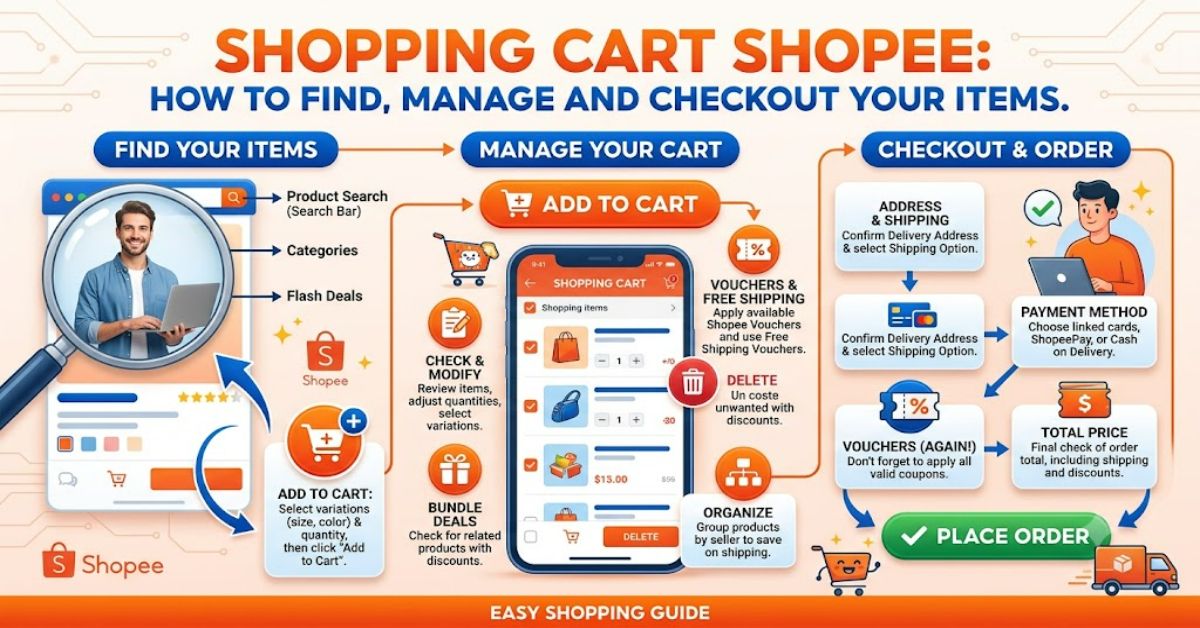
The shopping cart Shopee feature is the central place where users review products they have selected before completing an order. If you are using Shopee through a desktop browser, the cart is generally represented by a shopping-cart icon near the top of the page. On the mobile application, the exact layout can vary by country and app version, but the cart remains part of the purchasing process.
Shopee operates across multiple markets, including countries in Southeast Asia and Latin America, so the interface is not necessarily identical everywhere. Its official platform describes Shopee as an online shopping marketplace serving millions of users, with features including seller ratings and buyer protection. (Shopee, 2026)
For someone unfamiliar with the platform, the cart may appear to be a simple storage area for products. In practice, it does more. It allows buyers to compare selected items, change quantities, remove unwanted products and review applicable promotions before moving to checkout.
Shopee’s own Help Centre explains that shoppers can select Add to Cart from a product page, choose the products they want to purchase and then proceed to checkout. The checkout stage includes important details such as delivery address, shipping option, vouchers, coins and payment method. (Shopee Help Center, 2026)
Understanding this process can prevent common mistakes, particularly when several sellers, product variations or promotions are involved.
What Is the Shopping Cart on Shopee?
The Shopee cart works much like the basket found on other e-commerce platforms. When you find an item you may want to buy but are not ready to purchase immediately, you can add it to the cart.
The important distinction is that adding something to the cart does not normally mean that an order has been placed. The purchase is completed only after the shopper reviews the order and confirms payment through the checkout process.
This makes the cart useful for comparing products from different sellers or deciding which items should actually be purchased.
How to Access Your Shopee Cart
Accessing the cart is generally straightforward, although the exact interface can change after application updates or according to the local Shopee market.
| Platform | Typical Cart Access | Main Purpose |
| Desktop website | Shopping-cart icon near the top of the page | Review selected products |
| Mobile application | Cart section within the app interface | Manage products before checkout |
| Product page | Add to Cart option | Save an item for later purchase |
| Checkout | Selected cart products | Confirm the final order |
On a desktop browser, look towards the upper area of the Shopee page for the shopping-cart icon. Selecting it should take you to the products currently saved for purchase.
On mobile, open the Shopee application and locate the cart section. If the interface has changed after an update, the icon or position may look different from older screenshots or guides.
This is one reason users should rely on the current version of the application rather than assuming that an older tutorial represents the present interface.
How to Add Products to the Cart
Adding a product is usually completed from its product page.
First, choose the item you want to purchase. If the seller provides variations, such as colour, size, storage capacity or model, select the correct variation before adding the item.
Then select Add to Cart rather than immediately purchasing it.
Shopee’s Help Centre specifically describes this process as selecting the product, choosing the preferred variation where applicable, adding it to the cart and then selecting the products to purchase at checkout. (Shopee Help Center, 2026)
This matters because product pages can contain several versions of what appears to be the same item. Choosing the wrong variation can result in receiving a product that does not match your expectations.
Managing Items in the Cart
The cart is most useful when you treat it as a review stage rather than simply a storage space.
Before checkout, examine each selected product carefully. Check the seller, variation, quantity and listed price. If you no longer want an item, remove it or leave it unchecked when selecting products for checkout.
Key Cart Checks
| Check | Why It Matters |
| Product variation | Prevents ordering the wrong size, colour or model |
| Quantity | Avoids accidental multiple purchases |
| Seller | Helps assess reliability and product authenticity |
| Product price | Confirms the current cost |
| Shipping | Shows the actual delivery expense |
| Voucher | May reduce the final payable amount |
| Payment method | Confirms how the order will be paid |
A useful habit is to perform this review immediately before checkout, even if you added the products several days earlier.
Understanding Vouchers and the Final Price
One of the most important reasons to inspect the cart is that the final amount can depend on promotions and eligibility.
Shopee’s official purchasing guidance tells users to check available shop and platform vouchers, redeemable Shopee Coins, shipping options and payment information during checkout. (Shopee Help Center, 2026)
A product that looked inexpensive during browsing should therefore not be treated as having a guaranteed final price until the checkout screen has been reviewed.
The practical lesson is simple: judge the order by the final checkout amount, not only the promotional price displayed during browsing.
This is especially important during major promotional campaigns when multiple discounts can operate at the same time.
Shopping Cart Shopee vs Buy Now
Shopee generally provides two different purchasing paths: adding an item to the cart or using a direct purchase option.
| Feature | Add to Cart | Buy Now |
| Best for | Multiple products | Immediate purchase |
| Comparison | Easier | More limited |
| Multiple sellers | Convenient | Less convenient |
| Review stage | Stronger | Faster |
| Ideal use | Planned shopping | Single-item purchases |
The cart is preferable when you are still comparing products or want to buy several items together. The direct purchase route can be more convenient when you have already made your decision.
Common Problems With the Shopee Cart
Sometimes users may find that a product’s price, availability or promotional eligibility has changed after it was added.
This can happen because marketplace listings are dynamic. Sellers can alter stock, pricing and product variations. Promotional offers can also have eligibility conditions.
Another issue is confusion caused by multiple product variants. A listing may show a starting price that applies only to one variation, while another size or configuration costs more.
For that reason, checking the selected variation inside the cart is just as important as checking the product page.
Three Practical Insights for Safer Shopping
1. Treat the cart as a verification stage.
Do not consider adding an item to be the final purchasing decision. Use the cart to confirm the product, seller, variation and price.
2. Compare the final payable amount.
Shipping, vouchers and other adjustments can change the amount displayed during the earlier browsing stage.
3. Do not ignore seller information.
Shopee highlights seller ratings and buyer protections as parts of its marketplace environment. Those signals should be considered alongside product reviews and descriptions rather than relying solely on the product image or headline price. (Shopee, 2026)
The Future of Shopping Cart Shopee in 2027
By 2027, shopping carts are likely to become increasingly integrated with personalised recommendations, promotional systems and automated purchasing assistance. This direction is consistent with wider e-commerce development, where software increasingly helps users compare products and complete multi-step shopping tasks.
However, convenience also creates a trade-off. More automated recommendations can reduce the effort required to find products, but shoppers may become less attentive to seller quality, product specifications and final costs.
The strongest cart experience will therefore not simply make checkout faster. It will make important information easier to understand before money changes hands.
Key Takeaways
- The Shopee cart is a review and purchasing-management area, not simply a list of saved products.
- Product variations should always be checked before checkout.
- The final payable amount is more important than the initial promotional price.
- Vouchers and coins can affect the final transaction.
- Seller reputation remains important when buying through a marketplace.
- The mobile and desktop interfaces may differ between markets and app versions.
Conclusion
The shopping cart Shopee system is designed to make online purchasing more manageable by giving shoppers a place to collect and review products before checkout. Its real value comes from the control it provides during the final decision-making stage.
A careful shopper should use the cart to confirm the exact product variation, quantity, seller, price, shipping information, available vouchers and payment method. These checks take only a short time but can prevent common purchasing mistakes.
Shopee’s official guidance reinforces the importance of reviewing order details before placing an order, including delivery information, shipping options, promotions and payment choices. (Shopee Help Center, 2026)
Because Shopee operates across several markets, users should also recognise that menus, icons and promotional features can change between countries and application versions. The most reliable approach is therefore to follow the current interface while treating the cart as a final verification point before placing an order.
FAQs
Where is the shopping cart on Shopee?
On the Shopee website, the cart is generally represented by a shopping-cart icon near the top of the page. In the mobile app, the cart can be accessed through the app’s cart area. The exact position can change between markets and app versions.
How do I add an item to my Shopee cart?
Open the product page, select the required variation if one is available and choose Add to Cart. You can then open the cart and select which products you want to purchase.
Can I remove products from my Shopee cart?
Yes. Products can generally be removed from the cart when you decide not to purchase them. You can also select only certain products for checkout while leaving others in the cart.
Why is my Shopee cart price different?
The price can change because of product variations, seller pricing, shipping charges, promotional eligibility or vouchers. Always check the final checkout amount before placing the order.
Can I buy several products from my Shopee cart?
Yes. The cart is particularly useful for selecting multiple products before checkout. Shopee’s purchasing guidance specifically supports selecting multiple products from the cart before proceeding to payment.
Is adding an item to the Shopee cart the same as buying it?
No. Adding an item to the cart does not by itself complete the purchase. You must proceed through checkout and place the order after confirming the relevant details.
Methodology
This article was prepared using Shopee’s current official website and Help Centre material, with attention to the platform’s stated purchasing workflow. The guidance was cross-checked against current public descriptions of the Shopee application.
The main limitation is that Shopee operates different regional versions of its platform. Interface elements, promotional features and payment options can therefore vary by country, account and application version. The article avoids presenting one regional interface as universal.
No firsthand product testing has been claimed. Any interface-specific details should be checked against the current Shopee application or website before publication.
References
Shopee. (2026). Welcome to Shopee. Shopee.
Shopee Help Center. (2026). [New to Shopee] How do I buy a product on Shopee? Shopee Philippines.
Shopee. (2026). Shopee Guarantee and trustworthy sellers. Shopee marketplace information.
This article was drafted with AI assistance and should be reviewed and verified by a human editor before publication. Named claims, interface details and references should be independently confirmed by the editorial team at RubbleMagazine.co.uk.