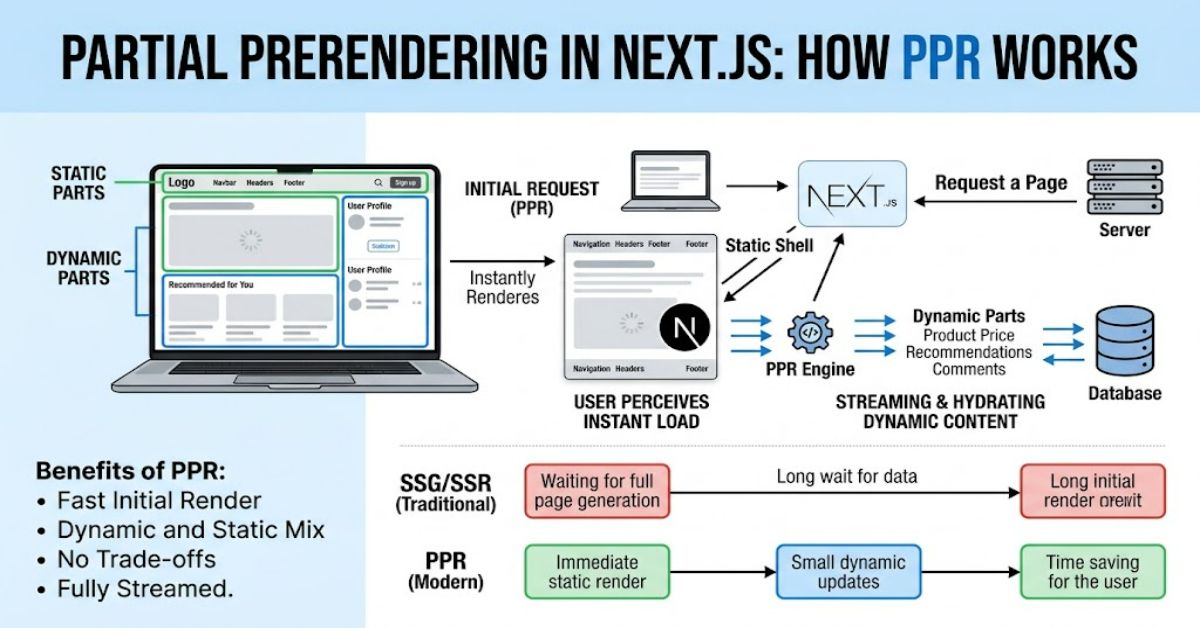
Partial Prerendering is a web rendering strategy in Next.js that combines fast static generation with dynamic content streaming inside a single response. Instead of forcing an entire page to be either static or dynamic, PPR separates the two. A visitor can receive the stable structure of a page immediately while personalised or data-dependent sections are rendered and streamed afterwards.
The idea became especially important as modern applications moved beyond simple static websites. A product page, for example, may contain a stable navigation bar and product description alongside a personalised promotion, shopping basket or account information. Rendering everything dynamically can delay the first response, while making everything static can make personalisation difficult.
Next.js introduced Partial Prerendering as a preview in Next.js 14 in October 2023. The approach evolved through subsequent releases, and Next.js 16, released on 21 October 2025, moved PPR into the broader Cache Components architecture. The old experimental PPR flag was removed.
That change matters for developers because modern Next.js applications should generally think in terms of static, cached and dynamic content rather than treating PPR as an isolated experimental switch.
How Partial Prerendering Works
The easiest way to understand PPR is to picture a page divided into two layers.
The first is the static shell. It contains content that Next.js can render ahead of the request. This might include navigation, headings, product information, article content and other stable components.
The second contains dynamic sections. These may depend on cookies, request headers, personalised information, database queries or external services. Instead of holding back the complete page, Next.js can stream these sections when they become available.
A Suspense boundary provides the separation. The fallback inside the boundary can form part of the initial shell, while the actual component is rendered later.
Next.js documentation demonstrates this pattern with a page containing a static header, cached product information and a dynamic promotion. The promotion is streamed at request time while the remainder of the page can be served from the prerendered output.
Static, cached and dynamic content
Under the current Cache Components model, the distinction is more useful than simply calling a component “static” or “dynamic”.
| Content type | Typical example | Rendering treatment |
| Static | Navigation, headings, fixed page content | Prerendered |
| Cached dynamic | Product catalogue or frequently reused API data | Cached and included in the shell |
| Request-time dynamic | Personalised account details | Streamed with Suspense |
| Runtime data | Cookies, headers or request-specific values | Deferred to request time |
This gives developers more control over where performance bottlenecks occur.
PPR and Cache Components in Next.js 16
The biggest misconception about Partial Prerendering today is that developers should simply enable the old PPR flag.
That is no longer the recommended model in Next.js 16.
The previous experimental_ppr configuration was removed. Instead, Next.js 16 uses Cache Components, enabled through the cacheComponents configuration. The framework describes PPR as the rendering behaviour produced by this model.
This is more than a naming change. Cache Components combines prerendering, caching and streaming into one programming model.
For example, a component that retrieves data which changes only occasionally can use use cache. That allows its result to become part of the prerendered shell rather than being unnecessarily fetched for every request. Conversely, genuinely request-specific content should remain dynamic and normally sit behind a Suspense boundary.
The practical lesson is simple: do not make everything dynamic merely because the application contains some dynamic data.
Why Partial Prerendering Can Improve Performance
The main advantage of PPR is reducing the amount of work that has to block the initial response.
Consider an online retail page. The site header, product name and product description may remain identical for thousands of visitors. A recommendation module, however, could depend on a user’s history.
Without a suitable rendering strategy, the personalised component can become part of the critical rendering path. With PPR, the stable page structure can be delivered while the personalised component continues processing.
This is particularly useful when the dynamic operation involves a slower database or external service.
Next.js documentation also recommends placing Suspense boundaries close to dynamic components. This maximises the amount of content that can enter the static shell and allows separate dynamic sections to render independently.
The less obvious benefit: failure isolation
PPR is not only a speed technique.
It can also make the rendering architecture more resilient. If a recommendation service takes longer than expected, the rest of the page does not necessarily need to wait for it. A well-designed fallback can preserve the page structure while the slower component resolves.
That does not eliminate backend failures, but it can reduce their impact on the initial user experience.
PPR Compared With Traditional Rendering
Different rendering strategies solve different problems.
| Approach | Initial response | Dynamic data | Main strength | Main limitation |
| Static generation | Very fast | Limited unless updated | CDN-friendly content | Personalisation is difficult |
| Server-side rendering | Depends on server work | Excellent | Fresh request-time content | Entire response can be delayed |
| Client-side rendering | HTML can be small | Excellent | Flexible interactive interfaces | More work moves to the browser |
| Partial Prerendering | Fast shell plus streamed sections | Excellent | Combines prerendering and dynamic rendering | Requires careful component boundaries |
PPR therefore should not be treated as a universal replacement for every rendering strategy. A completely static page may not need it. A highly personalised dashboard may contain so little reusable content that the benefits are smaller.
The architecture should follow the content.
The Practical Trade-Offs
PPR does introduce complexity.
The first challenge is deciding what should be cached. Caching data that changes rapidly can create stale output, while refusing to cache anything can waste the performance opportunity.
Next.js provides cache controls such as use cache and cache revalidation mechanisms for this reason. Cached content can be refreshed according to defined lifetimes or through revalidation operations.
The second challenge is fallback design. A Suspense fallback is not merely a technical placeholder. It becomes part of the user-visible shell. A poorly designed loading state can make an otherwise fast page feel unfinished.
The third issue is runtime data. Cookies, headers and other request-specific values cannot simply be treated as ordinary cached content. Next.js requires runtime-dependent components to be handled appropriately, typically through Suspense, while values extracted from request context can sometimes be passed into cached functions.
Three implementation insights
| Insight | Why it matters |
| Cache stable external data | Avoid repeating expensive work for content that does not require fresh data on every request |
| Keep Suspense boundaries narrow | Prevent one slow component from unnecessarily delaying unrelated page sections |
| Treat fallbacks as real UI | The fallback is visible during streaming and therefore affects perceived performance |
These principles reveal an important limitation: PPR does not automatically make an application fast. It gives developers a mechanism for separating work. Poor boundaries, excessive uncached requests or weak loading states can still produce a slow experience.
When Should Developers Use PPR?
PPR is particularly suitable for pages containing a mixture of reusable and request-specific content.
Good candidates include:
- E-commerce product pages
- News and editorial pages with personalised modules
- Marketing pages with dynamic promotions
- Search interfaces containing stable layouts and dynamic results
- Content platforms with personalised recommendations
- Public pages that contain small areas of user-specific information
It is less compelling when virtually every component depends on the incoming request.
A useful architectural test is to ask: How much of this page can be known before the visitor arrives?
If the answer is “most of it”, PPR and Cache Components can provide a strong fit.
The Future of Partial Prerendering in 2027
By 2027, the important development is unlikely to be PPR as a standalone feature. The direction already visible in Next.js 16 is towards treating prerendering, caching and streaming as parts of one rendering system.
Next.js 16 made Cache Components the central model and removed the older PPR configuration. The framework is also expanding its approach to navigation, caching and segment-level prefetching.
This suggests that future performance work will increasingly focus on component-level rendering decisions rather than choosing one rendering mode for an entire route.
Infrastructure will remain a constraint. Dynamic rendering still depends on server execution, data-store latency and network conditions. PPR cannot eliminate slow databases or poorly designed APIs. Instead, it allows developers to prevent those dependencies from unnecessarily blocking content that could have been prepared earlier.
The likely direction is therefore more granular caching and streaming, not simply more PPR configuration.
Key Conclusions
- Partial Prerendering combines prerendered and dynamic sections within the same route.
- The static shell can be delivered before slower request-time components finish.
- Suspense boundaries define where dynamic content can be deferred and streamed.
- Next.js 16 replaced the old experimental PPR flag with Cache Components.
- use cache is useful for dynamic data that does not need to be retrieved afresh on every request.
- Request-specific data such as cookies and headers requires different treatment from reusable cached content.
- PPR is most valuable when a page contains substantial stable content alongside smaller dynamic sections.
Conclusion
Partial Prerendering addresses a long-standing problem in web application architecture: static pages are efficient but limited for personalisation, while fully dynamic pages can make every visitor wait for server-side work.
Next.js approaches this problem by separating the page into work that can be completed ahead of time and work that genuinely needs the incoming request. The result is a static shell that can reach the browser quickly while dynamic sections stream into their designated locations.
The transition to Cache Components in Next.js 16 is particularly significant. Rather than treating PPR as an isolated experimental feature, Next.js now incorporates the concept into a broader system covering caching, prerendering and streaming.
For developers, the most important lesson is architectural rather than syntactical: identify stable content, cache what can safely be reused, and isolate genuinely dynamic work. Used that way, PPR becomes a practical rendering strategy rather than another configuration option to enable.
Frequently Asked Questions
What is Partial Prerendering in Next.js?
Partial Prerendering is a rendering approach that combines a prerendered static shell with dynamic content streamed at request time. It allows one route to contain both fast reusable content and personalised sections.
Is Partial Prerendering still available in Next.js 16?
Yes, but the implementation has changed. Next.js 16 removed the experimental experimental_ppr configuration. PPR is now integrated into Cache Components and enabled through the cacheComponents configuration.
Does PPR make every Next.js page faster?
No. PPR is most useful when a page contains substantial prerenderable or cached content alongside smaller dynamic sections. A page that is almost entirely request-specific may gain less from the approach.
What does Suspense do in Partial Prerendering?
A Suspense boundary defines a section that can be deferred. Its fallback can become part of the static shell, while the actual dynamic component is rendered and streamed when its work completes.
What is the difference between PPR and use cache?
PPR describes the overall rendering behaviour, while use cache provides a mechanism for caching components or functions so their results can be reused during prerendering or subsequent requests.
Can personalised content work with PPR?
Yes. Personalised content that depends on request-specific information such as cookies can be deferred to request time. It should be separated from the prerenderable portion of the page rather than forcing the entire route to wait.
Methodology
This article was researched using current primary documentation from the Next.js project, including the Next.js 16 release material, Cache Components documentation, the PPR documentation, migration guidance and the use cache API reference.
No independent performance benchmark or hands-on production test was conducted for this article. Accordingly, no original load-time measurements or fabricated testing results are presented. The documented Next.js examples were used as verifiable technical examples, particularly the product-page pattern in which static content and cached data form a prerendered shell while personalised content streams at request time.
The main limitation is that real-world performance depends on hosting infrastructure, CDN configuration, database latency, cache strategy, JavaScript execution and application architecture. PPR can reduce unnecessary blocking work, but it cannot compensate for an inefficient backend or inappropriate caching policy.
This article was drafted with AI assistance and should be reviewed by a qualified technical editor before publication. API behaviour, configuration requirements and framework terminology should be checked against the relevant Next.js version used by the project.
References
Lai, J., Story, J., Markbåge, S., Tim Neutkens, T., & Next.js Team. (2025, 21 October). Next.js 16. Next.js.
Next.js. (2025, 20 December). Cache Components. Next.js Documentation.
Next.js. (2026, 3 March). Migrating to Cache Components. Next.js Documentation.
Next.js. (2026, 27 February). use cache. Next.js Documentation.
Next.js. (2026). Building public pages. Next.js Documentation.
Next.js. (2026). Upgrading: Version 16. Next.js Documentation.
Markbåge, S. (2024, 24 October). Our journey with caching. Next.js.