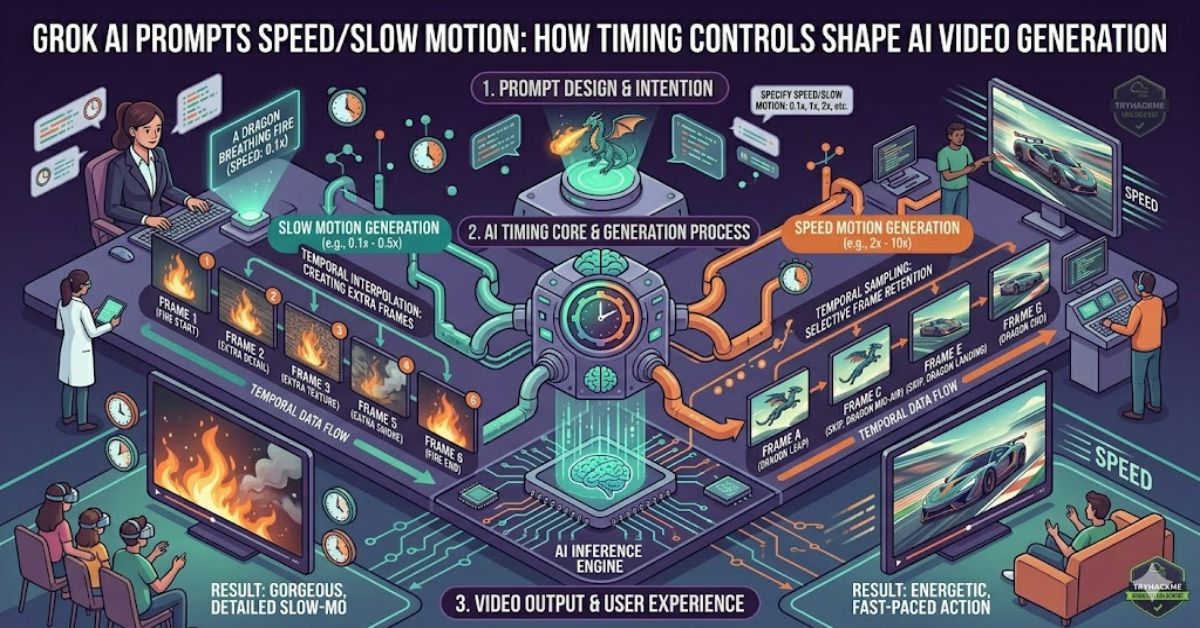
The phrase grok ai prompts speed slow motion refers to a growing area of AI video creation where users control not only what appears on screen, but also how movement unfolds over time. Modern generative video systems increasingly respond to instructions about pacing, acceleration, cinematic motion, and frame behaviour.
Many creators focus heavily on visual descriptions while overlooking temporal dynamics. Yet movement often determines whether a generated clip feels realistic, cinematic, dramatic, or artificial. A running athlete, drifting sports car, exploding wave, or flying drone can appear completely different depending on how motion instructions are structured.
Speed controls influence perceived velocity, action intensity, and narrative energy. Slow-motion instructions affect dramatic emphasis, emotional impact, and viewer attention. Combined correctly, they create sequences that feel intentionally directed rather than randomly generated.
As AI video generation continues advancing throughout 2026, prompt engineering has evolved beyond subject descriptions. Creators increasingly think like cinematographers, editors, and motion designers.
Understanding how speed and slow-motion commands work provides a major advantage for anyone producing AI-generated marketing content, social media videos, educational clips, or cinematic storytelling sequences.
Understanding Motion Instructions in AI Video Generation
Unlike image generation, video generation requires an AI model to predict movement across multiple frames.
This introduces a new challenge.
The system must determine:
- Object trajectory
- Camera movement
- Environmental reactions
- Motion continuity
- Timing consistency
When users include speed-related instructions, they provide additional guidance regarding temporal behaviour.
Examples include:
- Fast acceleration
- Gradual movement
- Slow-motion action
- Hyperlapse sequences
- Real-time pacing
- Cinematic tracking shots
The more precisely motion is defined, the more predictable the output becomes.
Why Speed Matters More Than Most Users Realise
Many unsuccessful AI videos share a common problem.
The subject is visually correct, but the movement feels unnatural.
For example:
“A racing motorcycle driving through Tokyo at night”
may generate a visually impressive result.
However:
“A racing motorcycle accelerating aggressively through Tokyo at night, high-speed tracking shot, realistic motion blur, rapid directional changes”
provides additional temporal context.
The second prompt helps establish:
- Motion intent
- Velocity expectations
- Camera behaviour
- Dynamic energy
This often improves overall coherence.
Comparison Table: Motion Prompt Styles
| Prompt Type | Result | Best Use Case |
| Static Motion | Minimal movement | Product showcases |
| Real-Time Motion | Natural pacing | Documentary-style scenes |
| High-Speed Motion | Increased energy | Sports and action content |
| Slow Motion | Dramatic emphasis | Cinematic storytelling |
| Mixed-Speed Motion | Variable pacing | Advertisements |
| Hyperlapse Motion | Accelerated movement | Travel and city content |
Slow Motion as a Creative Tool
Slow motion is not simply “slower movement.”
It changes audience perception.
Film-makers have used slow motion for decades because it allows viewers to observe details normally missed at real speed.
In AI-generated video, slow-motion instructions frequently help emphasise:
- Facial expressions
- Water splashes
- Sporting moments
- Explosions
- Dance sequences
- Wildlife movement
Prompt examples might include:
- “Ultra slow-motion water droplets”
- “240fps cinematic slow-motion effect”
- “Slow-motion fabric movement in wind”
These descriptions provide stronger temporal guidance than simply writing “slow motion.”
Practical Prompt Structures
Many experienced AI creators structure prompts using four motion layers.
Layer 1: Subject Action
What is moving?
Example:
“A falcon diving toward the ocean”
Layer 2: Speed Description
How fast is it moving?
Example:
“Extremely high-speed descent”
Layer 3: Camera Behaviour
How is the camera moving?
Example:
“Dynamic tracking camera”
Layer 4: Playback Style
How should viewers perceive motion?
Example:
“Cinematic slow-motion playback”
Combined prompt:
“A falcon diving toward the ocean, extreme velocity, dynamic tracking camera, cinematic slow-motion playback, realistic feather movement.”
Structured Insight Table
| Motion Variable | Impact on Output | Difficulty Level |
| Subject Speed | High | Low |
| Camera Motion | Very High | Medium |
| Motion Blur | Medium | Medium |
| Frame Consistency | Very High | High |
| Slow-Motion Playback | High | Low |
| Multi-Subject Motion | Very High | High |
Common Mistakes Creators Make
Contradictory Instructions
Many prompts contain conflicting information.
Example:
“Fast moving car, ultra slow movement, real-time action”
The AI receives competing signals.
Results often become inconsistent.
Ignoring Camera Motion
Users frequently describe the subject while forgetting the camera.
Motion quality depends heavily on camera behaviour.
Overloading Prompts
Adding too many speed-related instructions can reduce clarity.
Simple, deliberate direction usually performs better.
Original Insight #1: Motion Consistency Is More Important Than Visual Detail
Many creators chase higher-resolution imagery.
Yet viewers often notice motion errors before visual imperfections.
A slightly softer video with realistic movement frequently appears more professional than a detailed clip with inconsistent motion.
Original Insight #2: Slow Motion Amplifies AI Errors
Slow motion increases visibility.
Minor animation flaws that pass unnoticed at normal speed become obvious when playback slows down.
This means prompt quality becomes more important when using cinematic slow-motion sequences.
Original Insight #3: Camera Speed and Subject Speed Should Be Balanced
One overlooked issue is speed mismatch.
A rapidly moving subject combined with a static camera often feels artificial.
Professional-looking AI videos typically balance subject velocity with corresponding camera movement.
Real-World Impact of Motion Prompting
AI-generated video is increasingly used for:
- Advertising campaigns
- Product demonstrations
- Social media marketing
- Concept visualisation
- Creative storytelling
Motion control directly affects audience retention.
Marketing teams often discover that pacing influences engagement more than visual effects alone.
This makes temporal prompt engineering a practical business skill rather than a purely creative technique.
Risks and Trade-Offs
Motion-heavy generation creates challenges.
Computational Cost
Complex motion sequences often require greater processing resources.
Consistency Problems
Longer clips can introduce motion drift.
Realism Limitations
Physics simulation remains imperfect in many AI systems.
Fast-moving scenes may occasionally display unnatural object interactions.
Creators should review outputs carefully before publication.
The Future of Grok AI Prompt Motion Control in 2027
AI video systems are moving toward more sophisticated temporal control.
Several trends appear likely:
- Better motion coherence
- Improved frame interpolation
- More accurate physics modelling
- Enhanced camera path control
- Natural language cinematography commands
Future tools may allow users to specify movement similarly to directing a film crew.
However, realism challenges will remain. Human review and creative oversight are likely to stay essential even as generation quality improves.
Key Takeaways
- Motion instructions are often more important than visual descriptions.
- Speed controls influence pacing, realism, and viewer engagement.
- Slow motion works best when paired with detailed action descriptions.
- Camera movement should complement subject movement.
- Contradictory prompt instructions reduce output quality.
- Motion consistency frequently matters more than image sharpness.
- Effective AI video prompting increasingly resembles cinematography.
Conclusion
Understanding grok ai prompts speed slow motion requires thinking beyond simple text descriptions. Modern AI video systems interpret movement as a sequence of interconnected decisions involving subject dynamics, camera behaviour, pacing, and playback style.
The strongest results typically come from prompts that clearly define not only what appears on screen but how that scene evolves over time. Speed influences energy. Slow motion influences attention. Together they shape the emotional and visual impact of a generated sequence.
As AI video tools mature, creators who understand motion design will possess a meaningful advantage. Visual quality continues improving across platforms, making timing, movement, and pacing increasingly important differentiators.
The future of AI video generation will not belong solely to those who can describe images. It will belong to those who can direct motion.
FAQ
What does speed mean in AI video prompts?
Speed instructions tell the AI how quickly subjects or scenes should move. They influence pacing, motion blur, acceleration, and perceived energy.
How do Grok AI Prompts Speed Slow Motion affect generation?
Slow-motion prompts encourage the system to emphasise movement details and create a more cinematic presentation of actions.
Can speed and slow motion be used together?
Yes. A fast action can be generated and then presented in slow motion, creating dramatic visual contrast.
Why does camera movement matter?
Camera motion affects realism and storytelling. Subject movement without corresponding camera behaviour often feels unnatural.
What causes unrealistic motion in AI videos?
Conflicting instructions, excessive complexity, poor temporal consistency, and limitations in motion prediction models are common causes.
Do slow-motion videos require different prompts?
Usually yes. Detailed descriptions of movement and environmental interactions often improve slow-motion outputs.
Methodology
This article analyses common motion-control concepts used across contemporary AI video-generation workflows and prompt-engineering practices. The discussion focuses on temporal control, movement design, camera behaviour, and video realism.
Limitations include the evolving nature of AI video tools and changing feature sets. Readers should verify platform-specific capabilities directly from official documentation before implementing production workflows.
Editorial Disclosure
This article was drafted with AI assistance and should be reviewed and verified by the editorial team at RubbleMagazine.co.uk before publication.