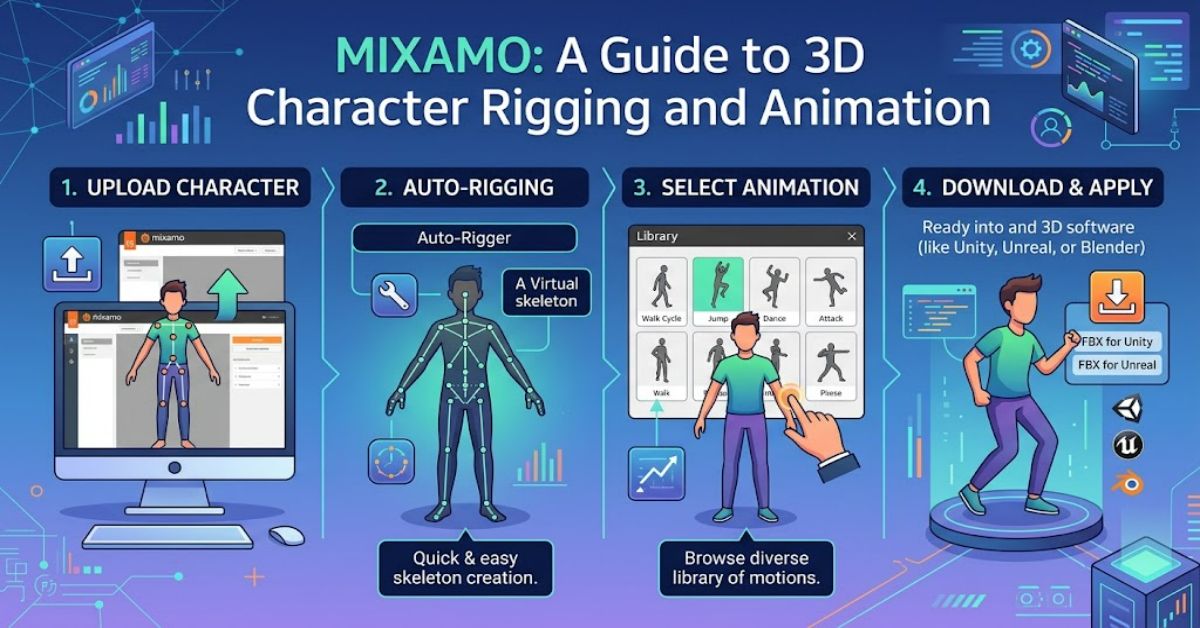
Mixamo is a web-based 3D character rigging and animation platform owned by Adobe. It helps users prepare characters for animation by automatically generating a skeletal rig and applying movements from a built-in animation library.
For game developers, students, and digital artists, this can remove some of the most technical steps in a traditional animation workflow. Instead of building a skeleton and assigning skin weights manually, users can upload a compatible character, adjust its placement, and allow the system to process it.
Mixamo is especially useful for prototypes, educational projects, indie games, and pre-visualisation. It does not replace every part of a professional animation pipeline, but it offers an accessible starting point for creators who want to animate characters without extensive rigging experience.
How Mixamo Works
The workflow generally involves three stages: preparing a character, selecting an animation, and exporting the result.
First, users upload a compatible 3D character model. For an unrigged character, Mixamo guides users through placing markers around important body joints, including the chin, wrists, elbows, knees, and groin. These markers help the system identify the character’s structure.
The platform then generates a skeletal rig. This skeleton provides the joints that control the character’s movement. Skinning connects the character’s mesh to the skeleton so that the surface deforms when the joints move.
Once the rig is ready, users can browse the animation library. Available movements cover actions such as walking, running, jumping, and other common character behaviours. Settings may allow adjustments to movement speed, direction, or other animation properties.
Finally, the animated character can be downloaded in a supported format for further work in a 3D application or game engine.
Main Features and Practical Uses
Mixamo combines automated rigging with ready-made animation assets. This makes it useful when a project requires moving characters but has limited time or animation resources.
Automated rigging: The platform creates a skeleton for compatible humanoid models, reducing the need for manual joint setup and skin-weight painting.
Animation library: Users can select pre-made movements instead of creating every action from scratch. This is particularly helpful when building early game prototypes.
Animation previews: Previewing movements makes it easier to compare different actions before exporting them.
Downloadable assets: Supported downloads allow creators to continue working in external software and integrate characters into broader production workflows.
| Feature | Main benefit | Important limitation |
| Automatic rigging | Reduces manual setup | Works best with compatible humanoid models |
| Ready-made animations | Speeds up prototyping | May not match a project’s exact style |
| Animation preview | Helps compare movements | Requires review for visual problems |
| Export options | Supports external workflows | Format and settings affect compatibility |
| Beginner-friendly process | Reduces the learning barrier | Does not replace broader 3D skills |
Advantages and Limitations
The main advantage of Mixamo is efficiency. Character rigging can require knowledge of skeleton design, joint placement, skin weights, and deformation. Automated processing makes these steps more accessible to people who are still learning 3D production.
The animation library also reduces the amount of repetitive work involved in prototyping. A developer can test character movement before commissioning custom animation or building a complete animation system.
However, automatic rigging is not perfect. Unusual proportions, complex clothing, non-humanoid characters, and poorly prepared meshes can produce disappointing results. Joints may deform unexpectedly, and movements can look unnatural when applied to characters with different body proportions.
Another limitation is artistic control. A ready-made walk cycle may be technically usable but fail to communicate the personality or mood required by a project. Commercial productions may therefore need custom animation, retargeting, or manual corrections.
Mixamo Compared with Other Animation Approaches
| Approach | Best suited for | Trade-off |
| Mixamo | Quick humanoid rigging and prototyping | Limited customisation compared with manual work |
| Manual rigging | Specialised characters and precise control | Requires more technical expertise |
| Motion capture | Naturalistic human movement | May involve equipment, processing, and cleanup |
| Keyframe animation | Stylised actions and artistic direction | Can require substantial animator time |
These methods are not mutually exclusive. A development team may use Mixamo for early prototypes, motion capture for realistic performances, and custom keyframe animation for distinctive actions.
Tips for Better Results
Start with a clean character mesh. Avoid unnecessary geometry, severe intersections, or poses that make joint placement difficult. A suitable neutral pose generally makes automatic rigging easier.
Place the rigging markers carefully and inspect the generated skeleton before choosing animations. Test several movements, paying attention to shoulders, hips, knees, and hands.
When exporting, select settings compatible with the target application. Game engines may require particular formats, scale settings, or skeletal conventions. Test a short animation in the destination software before processing an entire character library.
Finally, review licensing terms for the intended use. Check the current official terms before distributing assets, especially in commercial projects.
The Future of Mixamo in 2027
By 2027, automated rigging and AI-assisted animation may become more closely integrated with modelling software and real-time game development tools. Better automation could reduce repetitive setup work, although complex deformation and distinctive artistic performances will still require human judgement.
Interoperability will remain important. Developers need reliable ways to transfer characters, animations, skeletons, and materials between tools without losing scale or motion quality.
The wider direction is likely to favour hybrid workflows, where automation handles routine tasks and artists refine the final result. The precise pace of change depends on software development and industry adoption.
Key Takeaways
- Prepare character meshes carefully before uploading them.
- Use automatic rigging to accelerate suitable humanoid workflows.
- Inspect movements rather than assuming every animation will fit.
- Test export compatibility early in the project.
- Use custom animation when the desired performance needs greater artistic control.
- Review licensing and asset requirements before commercial distribution.
Conclusion
Mixamo offers a practical entry point into 3D character rigging and animation. Its automated tools and ready-made movement library can save time for beginners, students, and independent developers who need animated characters without building every element manually.
Its greatest value is speed and accessibility, particularly during prototyping and early production. Yet automation has limits. Character proportions, mesh quality, movement requirements, and export settings all affect the final result.
A balanced workflow uses Mixamo for tasks it handles well and combines it with external 3D tools or custom animation when a project demands greater control. With careful preparation and testing, it can help creators move from static models to animated scenes more efficiently.
Frequently Asked Questions
1. Is Mixamo free to use?
Mixamo has historically offered free access to its online rigging and animation tools through an Adobe account. Check the current official terms for availability and applicable conditions.
2. Can beginners use Mixamo?
Yes. Its guided rigging process and animation library make it accessible to people who have limited experience with character animation.
3. Can Mixamo characters be used in games?
Mixamo assets can be incorporated into supported game-development workflows, subject to applicable licensing terms and technical requirements.
4. Does Mixamo work with every 3D model?
No. Its automated rigging is designed primarily for compatible humanoid characters. Unusual shapes and non-humanoid models may require other methods.
5. Can Mixamo animations be edited?
Yes. Exported animations can be refined in compatible 3D software or game engines, depending on the format and workflow.
6. Is Mixamo suitable for professional projects?
It can support professional prototyping and production workflows. Complex characters or distinctive performances may still require manual rigging and custom animation.
Methodology
This guide summarises Mixamo’s commonly documented purpose and general character-animation workflow. No hands-on benchmark or independent product test was conducted for this article. Feature availability, export options, and licensing terms can change, so these details should be checked against Adobe’s current official documentation before publication.
References
- Adobe. Mixamo: 3D Character Animation.
- Adobe. Mixamo Help and Frequently Asked Questions.
- Autodesk. 3D Character Rigging and Animation Documentation.