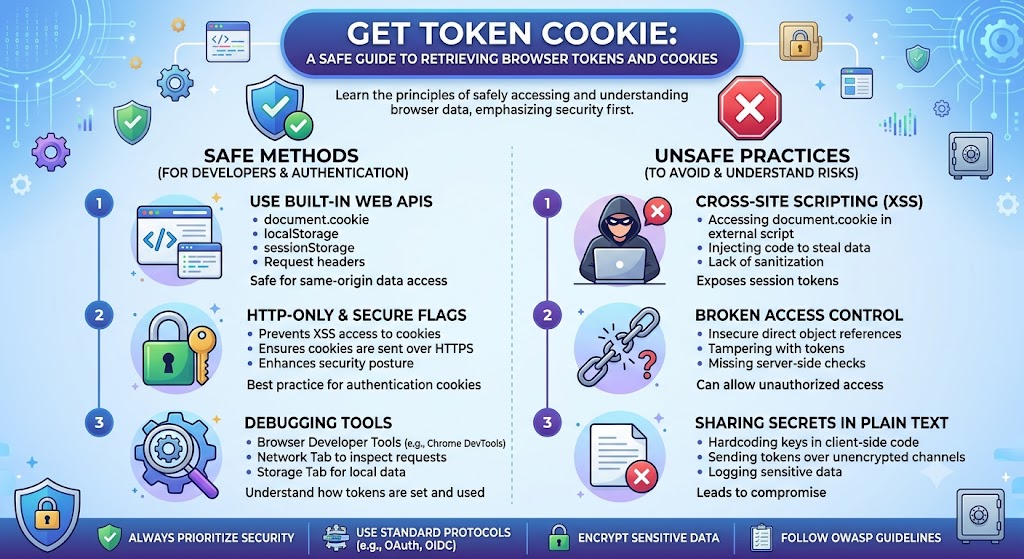
If you’re searching for how to Get Token Cookie, you’re likely trying to inspect authentication data for debugging, web development, or troubleshooting purposes. The safest and most reliable method is to use your browser’s built-in Developer Tools rather than installing third-party extensions or unknown software. Modern browsers allow you to inspect cookies, session storage, and local storage without compromising your computer’s security.
Although cookies and tokens help keep users logged in, they are sensitive pieces of information. Anyone with access to valid authentication credentials may be able to access the associated account. Therefore, you should only retrieve them from accounts you own or have permission to test.
What Is a Token?
A token is a digital credential generated after successful authentication. Instead of repeatedly asking users to log in, websites use tokens to verify their identity during future requests.
Common types include:
- JSON Web Tokens (JWT)
- OAuth Access Tokens
- Refresh Tokens
- API Tokens
Many modern web applications store these tokens in browser storage or secure cookies to maintain authenticated sessions.
What Is a Cookie?
A cookie is a small piece of data stored by your browser on behalf of a website. Cookies improve the browsing experience by remembering information such as:
- Login sessions
- User preferences
- Shopping carts
- Language settings
- Analytics information
Authentication cookies are especially important because they allow users to remain signed in without entering their passwords repeatedly.
Token vs Cookie
| Feature | Token | Cookie |
| Purpose | Authentication | Session management and preferences |
| Storage | Local Storage, Session Storage or Cookies | Browser Cookies |
| Sent Automatically | Usually No | Yes |
| Common Usage | APIs and mobile apps | Websites |
| Expiration | Configurable | Configurable |
Both mechanisms are widely used, and many modern applications combine them for better security and usability.
Safely Retrieve Authentication Data
If you need to inspect authentication information for your own website, application, or testing environment, browser developer tools are generally the safest option because they don’t require installing additional software.
Most browsers include built-in tools that allow developers to examine cookies, storage, and network activity. These features are designed for debugging and development and help identify issues such as expired sessions or authentication failures.
Avoid downloading browser extensions or programs that promise one-click extraction of sensitive authentication data unless they come from a trusted source and are necessary for your workflow. Unverified software can introduce unnecessary security risks.
When Developers Need Tokens or Cookies
Developers and IT professionals commonly inspect authentication information for legitimate reasons, including:
| Use Case | Purpose |
| API Testing | Authenticate API requests |
| Bug Fixing | Diagnose login problems |
| Web Development | Test authentication flows |
| QA Testing | Verify user sessions |
| Security Audits | Review authentication behaviour |
These activities are standard during software development and should always be performed with proper authorisation.
Security Risks
Although learning how to Get Token Cookie information is useful for development, it also comes with responsibilities.
Some common security risks include:
- Sharing authentication data with others
- Storing tokens in unsecured files
- Copying credentials into public forums
- Installing untrusted browser extensions
- Leaving developer tools open on shared computers
Even temporary authentication data can sometimes provide account access until it expires.
Best Practices
Follow these recommendations whenever handling authentication credentials:
- Use browser developer tools instead of unknown software.
- Never post tokens or cookies online.
- Sign out after testing shared computers.
- Enable multi-factor authentication whenever available.
- Rotate API tokens regularly.
- Keep browsers updated with the latest security patches.
These habits reduce the likelihood of account compromise while supporting secure development workflows.
Common Mistakes
Many beginners misunderstand how authentication works.
Typical mistakes include:
- Assuming cookies and tokens are the same thing.
- Saving authentication information in plain text.
- Sending sensitive credentials through email or messaging apps.
- Forgetting to revoke old API tokens after testing.
- Using browser extensions without reviewing their permissions.
Understanding these issues helps developers avoid accidental security problems.
The Future of Browser Authentication in 2027
Browser authentication continues to evolve. By 2027, security experts expect wider adoption of passwordless authentication, hardware security keys, and stronger protections for browser storage.
Modern browsers are already introducing improved cookie policies, stricter cross-site protections, and enhanced privacy controls. Organisations are also moving towards short-lived authentication tokens combined with continuous identity verification to reduce the impact of credential theft.
While cookies will remain important for many websites, newer authentication technologies are expected to improve both security and user experience.
Key Takeaways
- Browser developer tools are the safest way to inspect authentication information for authorised testing.
- Tokens and cookies serve different purposes but often work together.
- Protect authentication credentials as carefully as passwords.
- Avoid unknown browser extensions that request unnecessary permissions.
- Good security habits reduce the risk of account compromise.
Conclusion
Understanding how to Get Token Cookie information is valuable for developers, testers, and website administrators working on legitimate projects. Browser developer tools provide a reliable way to inspect authentication data without relying on potentially unsafe third-party software. At the same time, authentication tokens and cookies should always be treated as sensitive credentials because they can provide access to user accounts if mishandled.
As web security standards continue to improve, developers should stay informed about browser updates, stronger authentication methods, and evolving privacy protections. Following secure handling practices ensures that authentication data remains protected while allowing efficient troubleshooting and application development.
FAQ
Is it safe to retrieve cookies from my own browser?
Yes. Inspecting cookies for your own accounts using browser developer tools is a common and legitimate development practice.
Are tokens and cookies the same?
No. Tokens are authentication credentials, while cookies are browser-stored data that may contain session information or other website settings.
Why shouldn’t I use unknown browser extensions?
Some extensions request extensive permissions and may expose sensitive browsing data. Use trusted software only when necessary.
Can authentication tokens expire?
Yes. Most authentication tokens include expiration times for security reasons, although the duration varies by application.
Should I share my authentication cookies?
No. Authentication cookies and tokens should remain private because they may allow access to your account.
Methodology
This article was prepared using publicly available documentation on browser storage, web authentication concepts, and general web security best practices. It is intended for educational purposes and assumes authorised access to the accounts or applications being inspected. Readers should verify implementation details against the documentation for their browser, framework, or authentication provider before applying them in production environments.