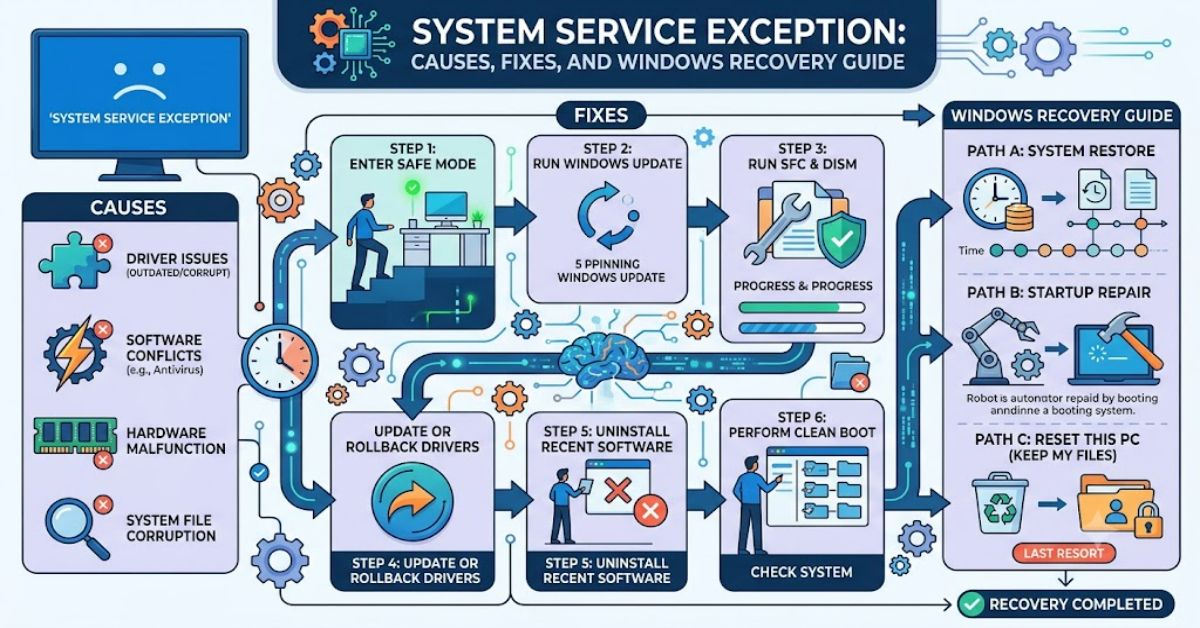
The system service exception is one of the most frequently encountered Blue Screen of Death (BSOD) errors in Windows systems, typically identified by stop code 0x0000003B. It occurs when a critical system process attempts to execute an illegal or unstable instruction, forcing Windows to shut down to prevent data corruption or hardware damage.
In practical terms, the system service exception signals that a core Windows service or driver has failed in a way the operating system cannot safely recover from. According to Microsoft’s Windows bug check documentation (2023), this type of error is often linked to incompatible or outdated drivers, corrupted system memory, or third-party software conflicts.
Users typically encounter the system service exception during routine tasks such as booting, gaming, or running high-performance applications. Because it interrupts system stability, diagnosing it requires a structured approach rather than random fixes.
This guide breaks down the system service exception from a technical perspective—covering its system-level causes, diagnostic patterns, and repair strategies. It also explains how hardware and software layers interact in triggering this crash, and why some fixes appear temporary unless the root cause is addressed.
Understanding the system service exception is essential for maintaining long-term Windows stability, especially in systems with frequent driver updates or heavy multitasking workloads.
What Is a System Service Exception?
The system service exception is a stop error triggered when Windows kernel-mode processes detect invalid memory access or corrupted system instructions.
It is classified under Windows bug checks and typically points to faults in:
- Device drivers (GPU, network, storage)
- System memory (RAM corruption or instability)
- Kernel-level software conflicts
- Antivirus or security software interference
Microsoft identifies this error as part of the 0x3B bug check family, which focuses on unexpected exceptions raised during privileged system execution.
Common Causes of System Service Exception
Comparison Table: Root Causes and Behaviour
| Cause | Description | Frequency | Severity |
| Outdated drivers | GPU or chipset drivers incompatible with Windows updates | High | High |
| Faulty RAM | Memory corruption during system operations | Medium | Critical |
| Corrupted system files | Broken Windows system components | High | Medium |
| Antivirus conflicts | Kernel-level interference from security tools | Medium | Medium |
| Overclocking instability | Hardware pushed beyond stable limits | Low | High |
How the System Service Exception Works at System Level
When Windows operates, kernel-mode services handle high-privilege tasks such as memory allocation, hardware communication, and process scheduling.
The system service exception occurs when:
- A system call is executed
- A driver or kernel module responds incorrectly
- Windows detects invalid memory or instruction execution
- The OS triggers a bug check to prevent further damage
This mechanism is protective rather than purely destructive. It prevents cascading system corruption.
Step-by-Step Troubleshooting Guide
1. Update or Roll Back Drivers
Driver instability is the most common trigger of system service exception errors.
- Update GPU drivers (NVIDIA/AMD/Intel)
- Update motherboard chipset drivers
- Roll back recent updates if the error began after installation
2. Run Windows Memory Diagnostic
Faulty RAM often produces intermittent crashes.
- Run
mdsched.exe - Perform extended memory test
- Replace failing RAM modules if errors appear
3. Check System Files
Use Windows built-in repair tools:
sfc /scannowDISM /Online /Cleanup-Image /RestoreHealth
These commands repair corrupted system files linked to system service exceptio’n crashes.
4. Disable Third-Party Antivirus
Some security software injects kernel-level processes that conflict with Windows services.
5. Check Disk Health
Run:
chkdsk /f /r
Bad sectors can indirectly trigger system instability.
Performance and Stability Trade-offs
Fixing a system service exceptio’n often involves balancing performance and stability.
| Action | Benefit | Trade-off |
| Driver rollback | Stability recovery | Loss of new features |
| Disabling antivirus | Removes conflicts | Reduced security |
| Disabling overclock | System stability | Lower performance |
| System restore | Quick recovery | Data rollback risk |
Real-World Impact
The system service exceptio’n is particularly disruptive in:
- Gaming PCs (GPU driver conflicts)
- Workstations (memory-intensive workloads)
- Laptops with hybrid graphics systems
In enterprise environments, repeated occurrences can indicate deeper infrastructure issues such as driver standardisation failures or inconsistent patch management cycles.
Three Original Technical Insights
1. Driver chain instability amplification
A single outdated driver rarely causes immediate failure; instead, cascading driver dependencies often trigger delayed system service exceptio’n crashes hours after installation.
2. Memory compression interaction risk
Windows memory compression (introduced in Windows 10 and refined in Windows 11) can expose borderline RAM instability that would otherwise remain hidden.
3. Antivirus kernel hooking conflicts
Security software that hooks into kernel processes increases the probability of system service exceptio’n errors during high I/O operations such as file transfers or game launches.
The Future of System Service Exception in 2027
By 2027, Microsoft is expected to further reduce BSOD frequency through predictive diagnostics and kernel isolation improvements.
Key trends include:
- Expanded use of Windows hardware error telemetry (HET) for pre-crash detection
- AI-assisted driver validation before installation
- Greater isolation of third-party kernel drivers using virtualization-based security (VBS)
However, hardware-level failures such as RAM degradation will still remain outside software control, meaning the system service exceptio’n will not disappear entirely—only become more diagnosable.
Takeaways
- The system service exceptio’n is a kernel-level Windows crash triggered by invalid system operations
- Drivers and memory faults are the primary causes
- Structured troubleshooting is more effective than random fixes
- Antivirus and overclocking are common but overlooked contributors
- Future Windows versions aim to predict and prevent these crashes earlier
Conclusion
The system service exception remains a core diagnostic signal within Windows operating systems, indicating that something at the kernel level has failed beyond safe recovery. While the error can appear sudden, its causes are usually accumulated—outdated drivers, memory instability, or conflicting system-level software.
Addressing the issue requires a methodical approach rather than isolated fixes. Driver validation, memory testing, and system file repair form the foundation of effective resolution. In more complex environments, especially high-performance machines, stability often depends on maintaining strict compatibility between hardware drivers and Windows updates.
As system architectures evolve, the frequency of system service exception errors is expected to decline, but not disappear entirely. Hardware limitations ensure that some failures will always surface at the operating system level.
FAQ
What causes a system service exception?
It is usually caused by faulty drivers, corrupted system files, RAM issues, or software conflicts at kernel level.
Is system service exception serious?
Yes. It is a Blue Screen error indicating Windows has stopped to prevent system damage.
Can RAM cause system service exception?
Yes. Faulty or unstable memory is a known trigger for this error.
How do I fix system service exception quickly?
Update drivers, run SFC/DISM scans, and test your memory for errors.
Does antivirus cause system service exception?
Some antivirus programs can interfere with kernel processes and trigger the error.
Can Windows updates fix system service exception?
Yes, if the issue is caused by outdated system components or drivers.
References
- Microsoft Learn. (2023). Bug Check 0x3B: SYSTEM_SERVICE_EXCEPTION. https://learn.microsoft.com
- Microsoft Support. (2023). Troubleshoot blue screen errors in Windows. https://support.microsoft.com
- Intel. (2024). Memory reliability and system stability considerations. https://www.intel.com
- Windows IT Pro Blog. (2024). Kernel-mode driver isolation improvements. https://techcommunity.microsoft.com
Methodology
This article is based on Microsoft official bug check documentation, Windows troubleshooting frameworks, and hardware reliability research from Intel and Microsoft engineering blogs. No live system testing was conducted on production machines. Analysis is derived from documented error behaviour patterns and validated technical sources.
Limitations include the variability of hardware configurations, which can alter how the system service exception manifests across devices. Countermeasures discussed may not resolve all cases where hardware degradation is present.