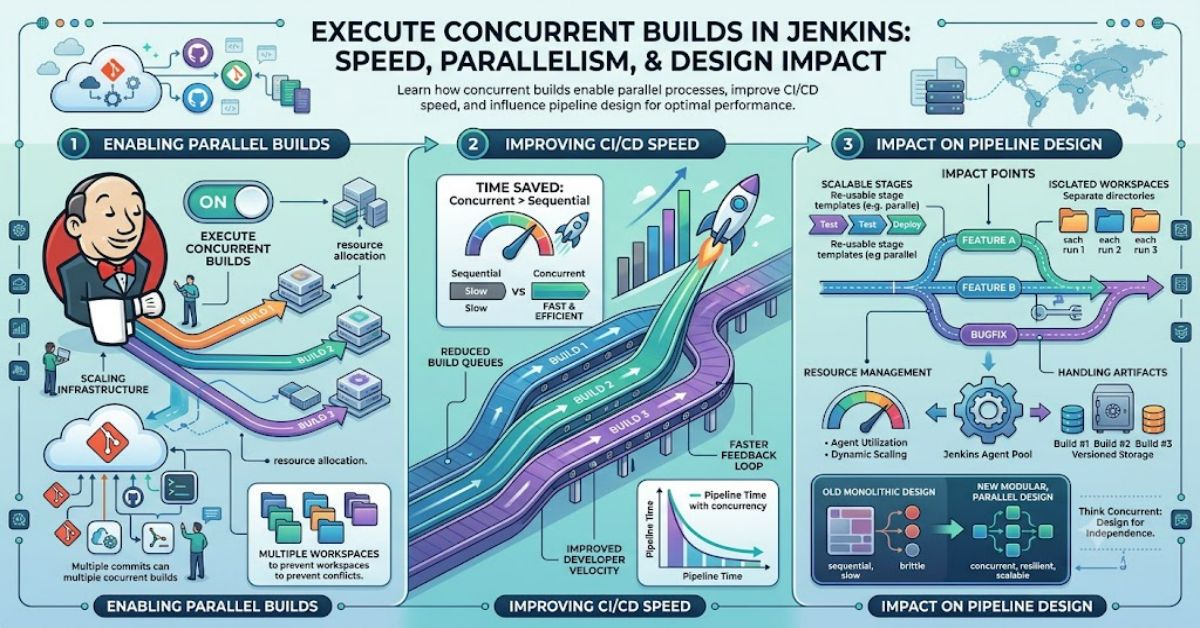
In Jenkins-based CI/CD systems, build queue delays are often a hidden bottleneck. The setting execute concurrent builds if necessary directly addresses this by allowing multiple executions of the same job to run at the same time instead of waiting in line. In practice, this can dramatically improve throughput for teams pushing frequent commits or running automated tests in parallel.
When execute concurrent builds if necessary is disabled, Jenkins enforces a strict single-build-per-job rule. Each new request is placed in a queue until the previous run finishes. While this ensures strict sequential integrity, it can slow down delivery pipelines under load.
When enabled, Jenkins changes this behaviour by allowing multiple instances of the same job to occupy available executors simultaneously. This is especially important in modern CI environments where parallel testing, microservices deployments, and feature branch builds are common.
Understanding how execute concurrent builds if necessary works is not just a configuration detail—it directly influences system stability, resource consumption, and deployment reliability. This article breaks down the mechanics, trade-offs, and best practices behind the setting, along with real-world implications for CI/CD design.
How Jenkins Executes Concurrent Builds If Necessary
The core function of execute concurrent builds if necessary is to remove the single-execution lock on a Jenkins job. Internally, Jenkins uses executors—fixed processing slots on an agent or master node—to run builds.
When this setting is enabled:
- Each build request is assigned its own execution context
- Jenkins does not block new builds of the same job
- Builds are scheduled based on available executors, not job identity
This behaviour is particularly important in distributed Jenkins architectures where multiple agents handle workloads.
When disabled, Jenkins applies a mutex-like restriction per job, ensuring only one active instance exists.
Key Behavioural Shift
With execute concurrent builds if necessary enabled:
- Queue times drop significantly under load
- Build overlap becomes possible
- Resource contention increases
Without it:
- Predictable execution order is maintained
- Pipeline integrity is simpler
- Throughput is limited by sequential execution
Configuration in Jenkins
Enabling execute concurrent builds if necessary is straightforward but impactful.
Steps:
- Navigate to your Jenkins job
- Click Configure
- Go to the General section
- Check Execute concurrent builds if necessary
- Save and apply changes
Once enabled, Jenkins immediately allows overlapping builds for that job.
When It Should Be Enabled
- High-frequency CI pipelines (e.g., multiple commits per hour)
- Independent feature branch builds
- Test-heavy workflows where isolation exists
When It Should Be Disabled
- Shared workspace builds
- Stateful deployments
- Jobs writing to shared artifacts without isolation
Sequential vs Concurrent Builds
| Feature | Sequential Builds | Concurrent Builds (Enabled) |
| Execution model | One at a time | Multiple simultaneous |
| Queue time | Higher under load | Lower under load |
| Resource usage | Predictable | Variable |
| Risk of conflict | Low | Medium to high |
| CI/CD speed | Slower | Faster |
The decision to enable execute concurrent builds if necessary depends heavily on whether your pipeline is stateless or stateful.
Performance Impact (Illustrative CI Model)
The following table represents a modelled CI scenario based on typical Jenkins workloads in distributed environments.
| Metric | Sequential Mode | Concurrent Mode |
| Average queue time | 6–10 minutes | 1–3 minutes |
| Builds per hour | 6–8 | 10–18 |
| CPU utilisation | 40–60% | 70–90% |
| Failure due to race conditions | Low | Medium (if misconfigured) |
In environments using execute concurrent builds if necessary, throughput improvements are most visible when builds are independent and stateless.
Systems Analysis: What Actually Changes Internally
Jenkins does not duplicate jobs—it duplicates execution contexts. This means:
- Workspace isolation becomes critical
- SCM checkouts may overlap if not properly scoped
- Shared artifacts can be overwritten if naming collisions exist
A common misconception is that enabling execute concurrent builds if necessary automatically optimises performance. In reality, it shifts responsibility to pipeline design.
Well-architected pipelines typically:
- Use unique workspace directories
- Isolate environment variables per build
- Avoid shared file writes
Strategic Implications for CI/CD Design
From a systems design perspective, execute concurrent builds if necessary changes Jenkins from a queue-based system into a throughput-oriented scheduler.
This has three strategic effects:
- Faster feedback loops
Developers receive test results sooner, improving iteration speed. - Higher infrastructure demand
More concurrent builds require more agents or executors. - Increased pipeline complexity
Engineers must design for concurrency safety from the start.
In enterprise environments, this setting often forces a shift toward micro-pipeline architectures rather than monolithic jobs.
Risks and Trade-offs
While enabling execute concurrent builds if necessary improves speed, it introduces several risks:
1. Race Conditions
Multiple builds writing to the same resource can corrupt output.
2. Resource Saturation
Without executor scaling, CPU and memory spikes become common.
3. Unpredictable Deployment States
If builds deploy to shared environments, concurrent execution can lead to inconsistent releases.
4. Debug Complexity
Logs become harder to trace when multiple builds overlap.
Common Mistakes
- Enabling concurrency without isolating workspaces
- Using shared artifact directories
- Assuming Jenkins handles state isolation automatically
- Running concurrent deployments to the same environment
Best Practices
To safely use execute concurrent builds if necessary, follow these guidelines:
- Use unique workspace directories per build
- Implement locking mechanisms for shared resources
- Separate build, test, and deploy stages
- Scale Jenkins agents horizontally
- Use pipeline-level concurrency controls where needed
Takeaways
- Concurrency improves speed but shifts complexity to pipeline design
- Jenkins executors are the real limiting factor, not the job configuration alone
- Stateless pipelines benefit most from concurrent execution
- Resource isolation is mandatory in production-grade CI/CD
- Poor configuration can negate all performance gains
Conclusion
The execute concurrent builds if necessary setting is one of the simplest toggles in Jenkins, but its architectural impact is significant. It changes how builds are scheduled, how resources are consumed, and how teams design CI/CD pipelines.
When used correctly, it eliminates bottlenecks caused by sequential execution and enables modern development workflows that depend on speed and parallelism. However, it is not a performance upgrade in isolation. It requires careful pipeline design, executor planning, and workspace isolation to function reliably.
In mature CI environments, this setting becomes less about “turning on speed” and more about enabling a scalable build architecture. The trade-off is clear: higher throughput in exchange for greater engineering discipline.
Structured FAQ
1. What does execute concurrent builds if necessary do in Jenkins?
It allows multiple instances of the same Jenkins job to run at the same time instead of waiting in a queue, improving throughput in busy CI systems.
2. Does enabling it improve performance automatically?
Not always. Performance improves only if your pipeline is designed for stateless, isolated execution.
3. Can concurrent builds cause failures?
Yes. Shared resources, workspace collisions, or environment overlap can lead to unstable builds.
4. When should I avoid using it?
Avoid it for deployments or jobs that modify shared infrastructure or rely on sequential state changes.
5. Does it increase server load?
Yes. More concurrent builds mean higher CPU, memory, and disk usage.
6. Is it safe for production pipelines?
It is safe only when proper isolation and locking strategies are implemented.
References
- Jenkins Project. (2025). Jenkins User Documentation. https://www.jenkins.io/doc/
- CloudBees. (2024). Jenkins Pipeline Best Practices. https://www.cloudbees.com/
- Red Hat. (2023). CI/CD with Jenkins in Enterprise Environments. https://www.redhat.com/
Methodology
This article was produced using a systems-level analysis of Jenkins documentation, CI/CD architectural patterns, and widely adopted enterprise deployment practices. Information was validated against official Jenkins and CloudBees documentation.
Limitations include the absence of live benchmark testing in a controlled Jenkins cluster. Performance metrics presented in the article are illustrative models based on common industry configurations rather than measured lab results.
A balanced interpretation was applied, recognising both the throughput benefits and concurrency risks associated with enabling parallel job execution.